
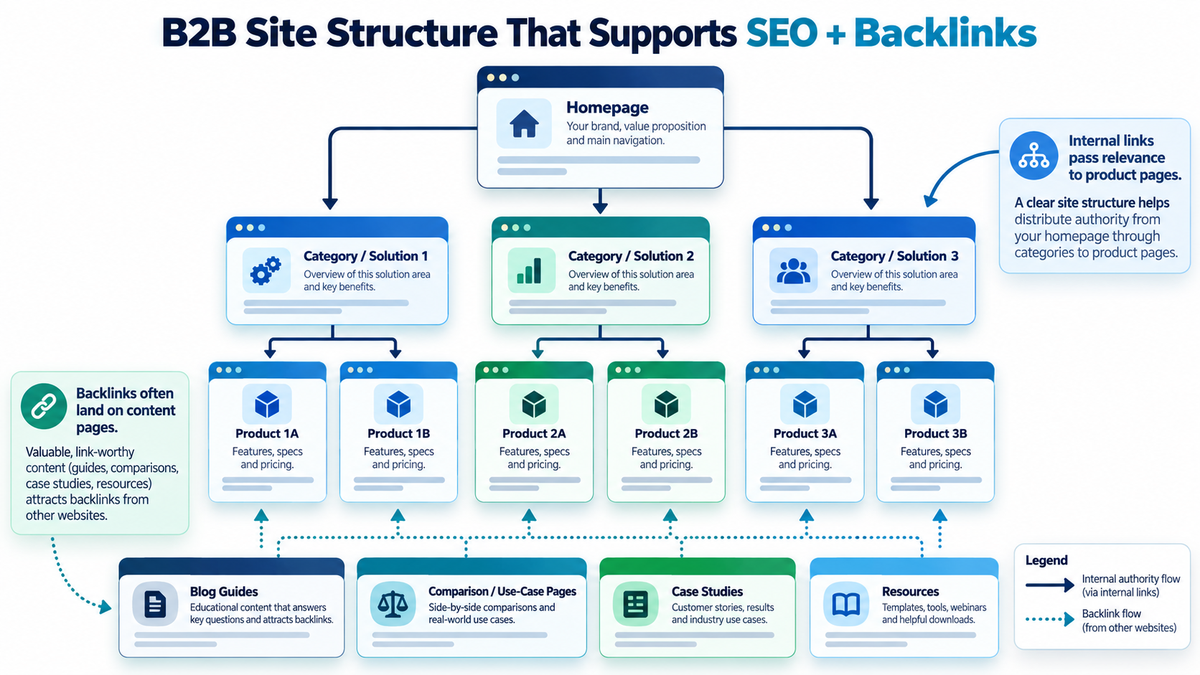
A B2B website needs more than attractive product pages, informative blogs, and quality backlinks to perform well in search results; how these pages are organised and connected determines whether search engines understand your catalog and whether commercial buyers find the right solutions. A clear B2B website structure establishes a four-tier architecture connecting your homepage, solution category pages, individual product pages, and supporting educational resources through deliberate internal links. Because commercial software and product pages rarely attract natural editorial backlinks on their own, a connected site structure allows link equity from original research, guides, and industry checklists to flow directly into your core product offerings. By organising features around specific buyer workflows, exposing clear conversion pathways, and eliminating orphan pages, B2B companies help search engine crawlers discover indexable assets while guiding qualified prospects directly from initial problem research to requesting a product demonstration.
Here are a few important factors to consider:
- Website structure affects discoverability: Google uses links to discover webpages, making clear navigation and internal linking important for helping search engines find relevant content.
- Internal links connect content with products: Informational blogs and industry resources can guide visitors and search engines towards relevant product and solution pages.
- Backlinks support more than individual pages: External links pointing to useful resources can contribute ranking signals to those pages, while internal links can help connect them with related commercial content.
- B2B buyers need clear navigation: Buyers often research problems, compare solutions, and evaluate product specifications before making an enquiry. A logical website structure helps them move through these stages.
Considering these factors, a well-planned B2B website structure is essential for making SEO, content marketing, and link building work together. Even a website with valuable content and relevant backlinks may struggle to support its most important product pages if those pages are difficult to discover or poorly connected to the rest of the site.
The goal is not simply to organise pages into categories. It is to create a clear relationship between your homepage, solutions, products, and educational resources so that search engines can understand your offerings and potential customers can navigate from research to enquiry.
In this guide, we'll explore how to structure a B2B website, design SEO-friendly product pages, organise content hierarchies, and build internal linking pathways that connect backlink-worthy resources with commercial pages.
What Is B2B Website Structure, and Why Does It Matter for SEO?
B2B website structure refers to how pages are organized and connected through navigation menus, page hierarchies, URLs, and internal links.
Unlike a simple business website containing a homepage, service page, and contact form, a B2B website may need to accommodate several products, industry-specific solutions, technical resources, and customer case studies.
Consider a company selling software for distributors. Its website might have separate pages for order management, inventory tracking, payment collection, and warehouse operations. Potential customers may also want implementation guides, integrations, pricing information, and examples of how similar businesses use the software.
Without a clear structure, these pages can become a disconnected collection of information. A logical structure helps in three ways:
- Search engine discovery: Internal links help crawlers find product pages and understand how different pages relate to one another.
- Topical relevance: Linking related products, solutions, and educational resources provides context about the subjects covered by the website.
- Buyer navigation: Visitors can move from exploring a business challenge to understanding a suitable product and taking the next step.
Google's documentation on website navigation and page relationships explains that links between pages help its systems understand their relative importance. For a B2B business, website architecture should therefore be planned around both product discovery and the information buyers need before making a decision.
Build a Clear B2B Website Hierarchy Before Optimizing Product Pages
Before optimizing individual product pages, decide how they should fit into the overall website. Each important offering needs a logical place, and related content should be accessible without unnecessary navigation. A practical B2B website structure includes four main types of pages.
1. Homepage
The homepage introduces the business and directs visitors toward its primary offerings. It should include:
- A clear explanation of what the company offers and who it serves.
- An overview of core solutions with links to their dedicated pages.
- Important industries, applications, or customer segments.
- Client testimonials, logos, or relevant trust signals.
- Clear calls to action, such as Request a Demo or Contact Sales.
2. Solution or Category Pages
These pages organize related offerings around customer needs. Each should include:
- The business problem the solution addresses.
- An overview of related products and their capabilities.
- Industry applications and practical use cases.
- Links to individual product pages.
- Relevant case studies, resources, and enquiry options.
3. Individual Product Pages
Product pages explain a particular offering and help buyers evaluate whether it meets their requirements. Include:
- A clear product description and intended audience.
- Features explained through practical business benefits.
- Screenshots, demonstrations, specifications, and integrations.
- Relevant use cases and customer evidence.
- Pricing or quotation information and a clear conversion path.
4. Supporting Content Pages
Supporting resources answer questions that buyers ask while researching or comparing solutions. These may include:
- Educational blogs, tutorials, and how-to guides.
- Product comparisons and buying guides.
- Industry research, reports, and calculators.
- Customer stories and technical documentation.
- Contextual links to related solutions and product pages.
How a B2B Site Structure Works in Practice
Imagine a B2B software company offering inventory management tools. Its inventory solution page could introduce stock tracking, reconciliation, and forecasting products. Each product would have a dedicated page explaining its capabilities, while relevant guides and case studies would link to those offerings.
| Page type | Example URL |
|---|---|
| Homepage | example.com |
| Solution page | example.com/solutions/inventory-management/ |
| Product page | example.com/products/stock-reconciliation/ |
| Educational guide | example.com/blog/reduce-stock-discrepancies/ |
| Case study | example.com/case-studies/inventory-accuracy/ |
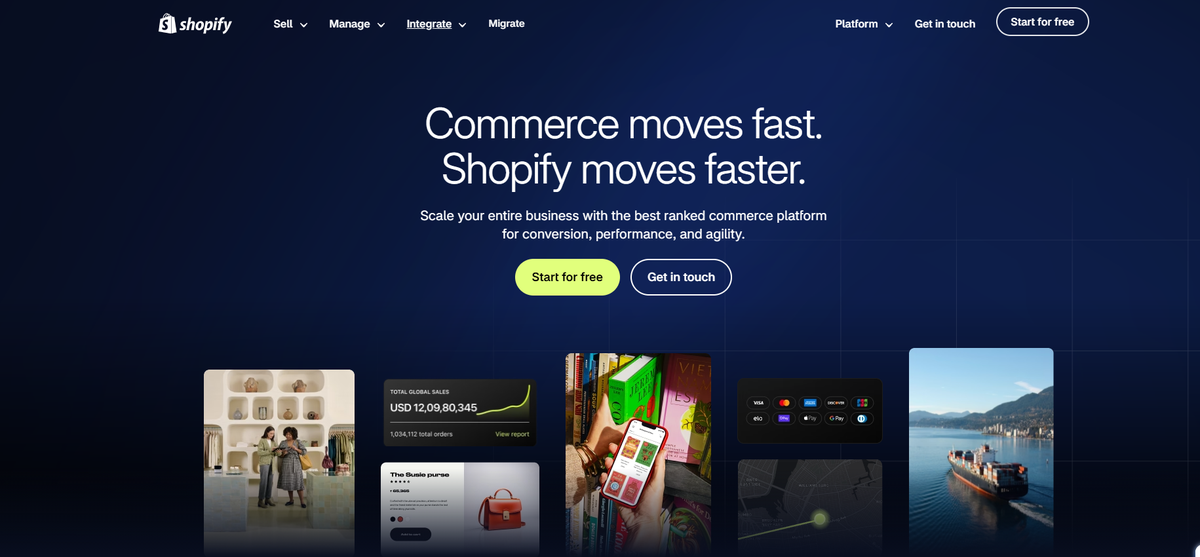
These URLs demonstrate page organization, but the links connecting them are more important than the folder names themselves. For a real example, Shopify's enterprise website organizes offerings around selling, operations, integrations, industries, and enterprise resources. It demonstrates how multiple offerings can be made accessible through recognizable categories.
The exact number of levels will depend on your business. A company with one flagship product may need a simpler architecture than an enterprise software provider with dozens of products. What matters is that important pages are easy to reach and logically connected.

How to Design B2B Product Pages That Support SEO and Conversions
Once the website hierarchy is clear, the next priority is designing individual product pages. A B2B product page needs to do more than describe features. It must help buyers determine whether the product solves their problem, whether it fits their existing systems, and whether they should contact your sales team. That requires a balance between search optimization, useful information, and page design.
Start with a Clear Product Title and Introduction
Your product page should immediately explain what the product does. For example, a headline such as "Advanced Business Solutions" tells visitors very little. A more descriptive headline could be "Inventory Reconciliation Software for Distributors and Warehouses." This communicates the product category, intended audience, and core functionality.
The introductory paragraph should then explain how the product helps businesses compare stock records, identify discrepancies, or improve inventory visibility. Use the primary keyword naturally in the title, H1, and relevant page content. Avoid repeating the same phrase simply to increase keyword frequency.
Connect Product Features with Business Benefits
B2B buyers want to understand what a feature will help them accomplish. Instead of presenting "Automated Stock Reports" as a standalone feature, explain how automated reporting can reduce repetitive data preparation and help managers identify stock discrepancies more efficiently. Screenshots, demonstrations, and concise feature descriptions can make complex products easier to understand.
Each feature should answer two questions: What does it do, and why does it matter to the buyer?
Show Industry Applications and Use Cases
A product may solve different problems across industries. Inventory software, for example, might help FMCG distributors manage stock movement across locations, while manufacturing businesses may use it to monitor raw materials.
Where these differences are significant, create dedicated industry or use-case pages and link them to the main product page. Avoid nearly identical industry pages where only the industry name changes. Each page should provide distinct examples, requirements, or product information.
Add Technical Details and Credible Proof
B2B purchases often involve operational, technical, and financial evaluation. Depending on the product, buyers may need information about:
- Software integrations and compatibility.
- Security, compliance, and data management.
- Implementation timelines and onboarding.
- Product specifications or API documentation.
- Customer testimonials and documented outcomes.
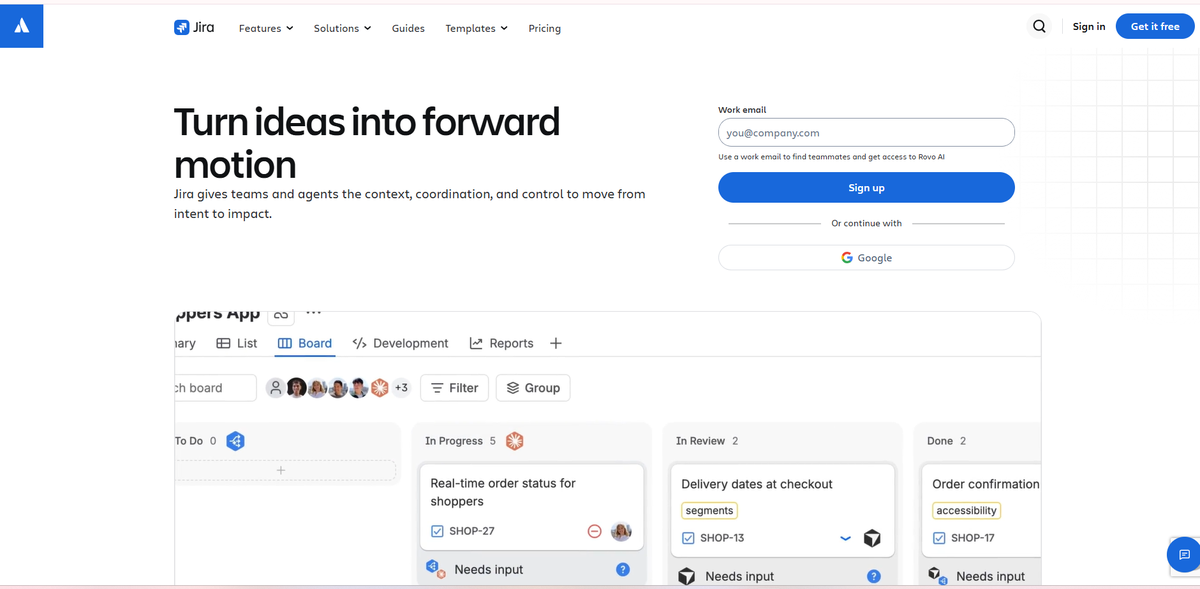
A useful real-world example is Atlassian's Jira product website, which combines product information with explanations, customer examples, and related resources. Its enterprise offering also addresses enterprise-specific concerns such as security, scale, and support. This illustrates how a B2B product website can present different levels of detail for different buyer requirements.
Make the Next Step Clear
Not every visitor is ready to speak to sales. Some may want a demonstration, while others need technical documentation or pricing details before proceeding. Include a primary CTA, such as Request a Demo, and an appropriate secondary option, such as View Documentation or Explore Pricing.
A well-designed page should also answer common questions about integrations, onboarding, support, and costs. Link to relevant case studies, comparisons, and guides so buyers can explore additional information without leaving the website.
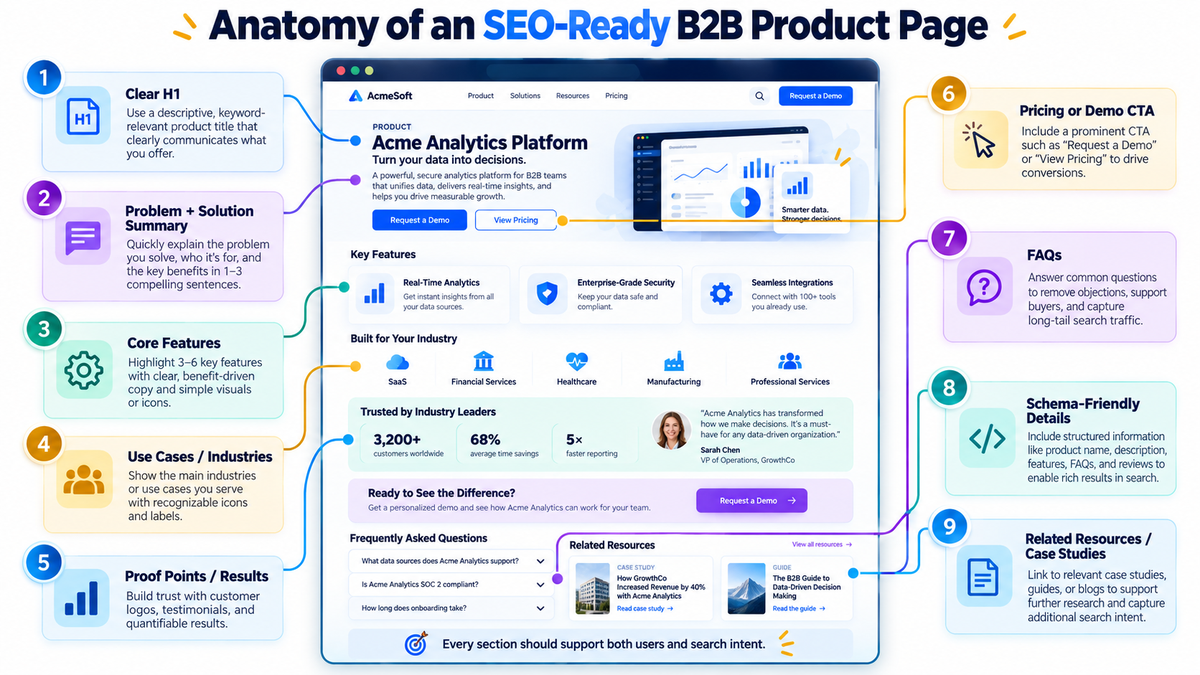
The page's visual design should support this information hierarchy. Clear headings, readable sections, mobile-friendly layouts, and accessible navigation help buyers evaluate complex offerings. When choosing the best website design company for a B2B project, evaluate whether it can plan content architecture, product-page layouts, technical accessibility, and conversion paths together. An attractive design may create a positive first impression, but the structure determines how easily visitors can find the information they need.
How Website Structure Helps Backlinks Support Your B2B Product Pages
This is where website architecture and backlink strategy intersect. B2B product pages are often difficult to earn editorial backlinks to because their primary purpose is commercial. An industry publisher may have little reason to reference a software demo page, but it may link to a useful research report, industry benchmark, or detailed educational guide.
The challenge is that the pages attracting backlinks are not always the pages you want to rank for commercial searches. A well-connected website helps bridge that gap.
1. Distribute Link Equity Through Internal Links
When an external website links to one of your resources, that page may receive link-related ranking signals, often called link equity or link juice. Internal links help connect that resource to other relevant pages. In PageRank-based systems, links can pass ranking signals between pages, although the amount passed is not fixed or guaranteed.
Suppose a B2B software company publishes a report on inventory management challenges, and an industry publication links to it. The website could create this path:
Industry publication → Inventory research report → Inventory management solution → Stock reconciliation product page
The research report earns the external reference, while internal links connect it to the relevant solution and product. This does not guarantee higher rankings, but establishes useful pathways for search engines, potential customers, and link-related signals.
2. Organize Related Content into Topic Clusters
A topic cluster connects a central solution or subject with related product pages and supporting resources. For example, an inventory management cluster might contain:
- Central solution: Inventory Management Software.
- Related products: Stock Tracking, Stock Reconciliation, and Inventory Forecasting.
- Educational resources: Inventory Auditing, Stock Accuracy, and Warehouse Reporting Guides.
- Supporting evidence: Industry Use Cases and Customer Case Studies.
When these pages link to one another where relevant, they establish clearer relationships between the overarching problem and the individual products that address it.
The advantage does not come from placing pages inside the same directory or assuming a backlink automatically powers every connected page. The benefit comes from helping search engines understand how your content relates to your products, and helping potential buyers move naturally from educational material to commercial evaluation.
3. Prevent Important Product Pages from Becoming Orphan Pages
An orphan page has no incoming internal links. For example, a business may create a new software feature or solution page but forget to add links to it from related categories, main navigation, or existing blog posts.
To avoid this, ensure commercially important pages are accessible through appropriate category pages, relevant articles, and site navigation. A crawler should not need to search through XML sitemaps alone to find an important product.
4. Keep Important Pages Easy to Access
If visitors must navigate through several unrelated categories before reaching a product, the structure may be too complex.
Focus on logical navigation, useful internal links, and making priority product pages accessible from relevant categories and supporting resources without unnecessary friction.
5. Use Descriptive Anchor Text
Anchor text provides context about a linked page. For example, a guide explaining warehouse stock discrepancies could use descriptive anchor text such as "automated stock reconciliation software" when linking to a relevant product page, rather than generic text like "click here."
Use descriptive wording without repeatedly forcing exact-match keywords into unrelated content.
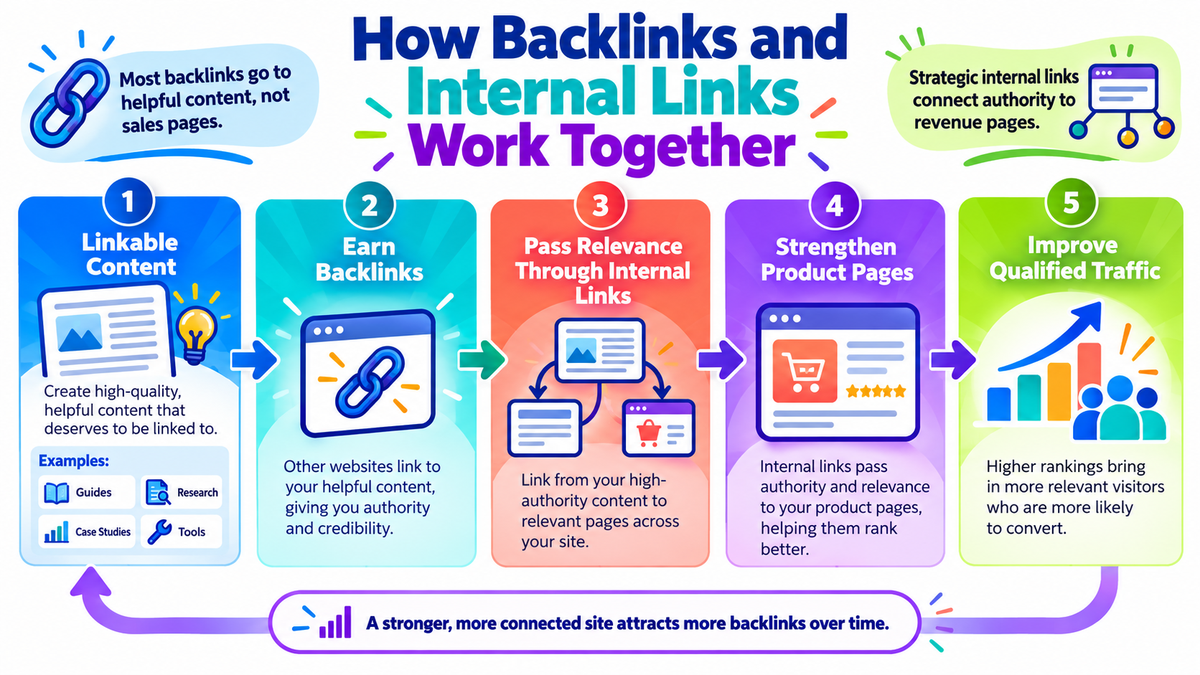
These connections influence how you approach link building. Instead of pursuing backlinks indiscriminately, identify credible resources worth referencing and ensure those pages connect to relevant commercial content. A white hat link building agency can support the process through publisher research, editorial content development, and relevant backlink opportunities. However, the website still needs a logical internal structure to connect those resources with its product offerings.
The objective is not simply to acquire backlinks. It is to make externally referenced content part of a coherent path leading toward commercial offerings.
A Practical Example: Connecting Content, Products, and Backlinks
Let's put the principles together using an imaginary B2B inventory software provider. The company offers a stock reconciliation tool and wants to support it through content and backlinks.
Instead of depending entirely on backlinks to that product page, it creates a supporting content plan:
| Content asset | What it offers | Relevant internal destination |
|---|---|---|
| Inventory Accuracy Benchmark Report | Original research for distributors | Inventory management solution |
| How to Reduce Stock Discrepancies | Practical problem-solving advice | Stock reconciliation product |
| Manual vs Automated Stock Reconciliation | Comparison for evaluating options | Product page and demo |
| Inventory Management for FMCG Distributors | Industry-specific application | Inventory solution and use-case pages |
| Stock Reconciliation Checklist | Downloadable working resource | Related guide or product page |
The company publishes a detailed inventory accuracy report containing original findings. If relevant industry publications reference the research, the report may attract external backlinks. Within the report, a contextual link leads to a guide explaining how businesses can address common stock discrepancies.
That guide then introduces the relevant reconciliation software where it helps explain an available approach. At the same time, the product page links to a practical case study and technical documentation for buyers who need more evidence before requesting a demonstration.
Notice that not every resource needs to link directly to the product page. Links should follow genuine relationships between the information, the buyer's questions, and the product.
What Real B2B Websites Can Teach Us
HubSpot: Connecting Products with Educational Resources
HubSpot maintains dedicated product pages alongside educational materials, templates, and training resources. Its resource library provides useful examples of how a software business can create resources that serve informational needs beyond the product page itself. The practical lesson is to give educational content a clear purpose and connect it to relevant product journeys when appropriate.
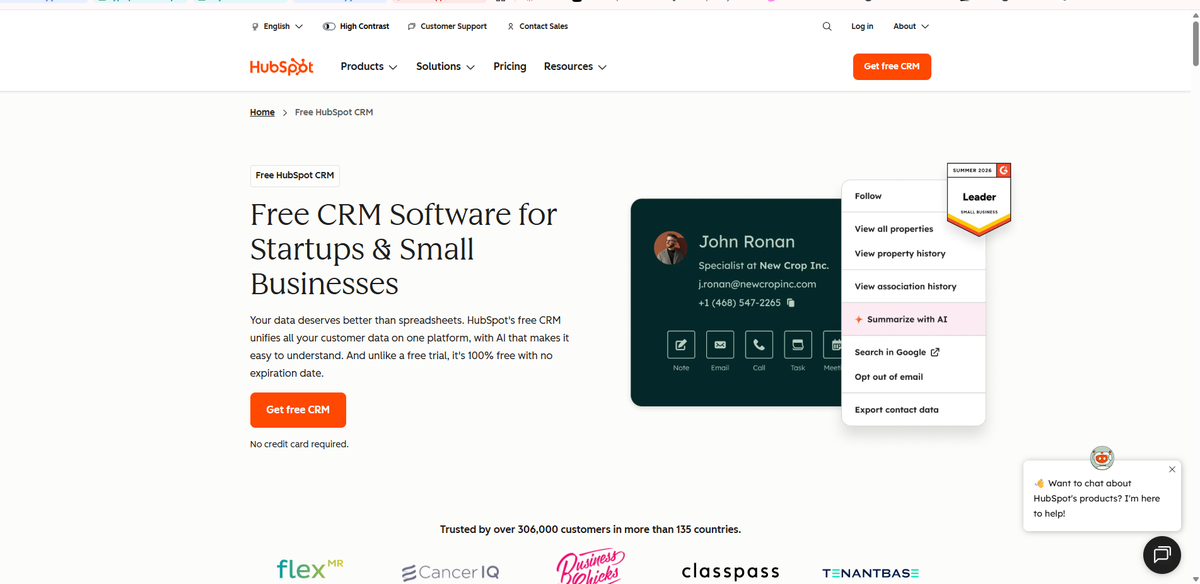
Atlassian: Connecting Product Information with Customer Evidence
Atlassian presents Jira as a product while offering supporting information for buyers with different requirements. Its Jira Enterprise materials address enterprise concerns, while customer stories provide examples of real-world applications. The lesson is that buyers need different types of content as they progress from understanding a product to evaluating whether it meets their requirements.
Takkada: Organising B2B Software Features Around Business Needs
A practical example is Takkada, a business automation platform for Indian distributors using Tally. Its website organises product features around everyday business operations, including order management, invoicing, inventory, payment collection, and reporting. It also provides industry-specific pages, product guides, and educational resources that help visitors explore relevant capabilities.
For B2B businesses, the lesson is to organise complex offerings around customer needs rather than presenting every feature on a single page. Clear product categories and supporting resources can make it easier for potential buyers to find relevant information and evaluate solutions.
These are examples of publicly visible website design and content organization. They should not be interpreted as proof of specific backlink performance or rankings.
Common B2B Website Structure Mistakes That Limit SEO
Even websites with useful content and strong products can struggle when their architecture creates unnecessary barriers. Here are five common mistakes to check.
1. Product Pages Are Buried Too Deep
When product pages are accessible only through complicated navigation, visitors may have difficulty finding them. Link important offerings from the relevant category, navigation, and supporting content.
2. Several Pages Target the Same Search Intent
Creating separate pages for minor keyword variations can lead to repetitive content and unclear page targeting. Give each product or solution page a distinct purpose. Consolidate overlapping content when separate pages do not provide meaningful additional value.
3. Educational Content Is Disconnected from Commercial Pages
A useful blog may attract readers and backlinks but offer no path to a related product. Review the content and add contextual internal links where readers could benefit from learning about a relevant solution.
4. Important Product Details Are Difficult to Access
Some websites place key information inside images, complex interactive elements, or interfaces that do not expose accessible links. Keep essential product information available as readable page content, and make navigation links crawlable.
5. Broken Links and Orphan Pages Go Unnoticed
Website redesigns, discontinued products, and URL changes can leave broken links or important pages without incoming internal links. Audit internal links periodically, fix broken destinations, and implement appropriate redirects when URLs change.
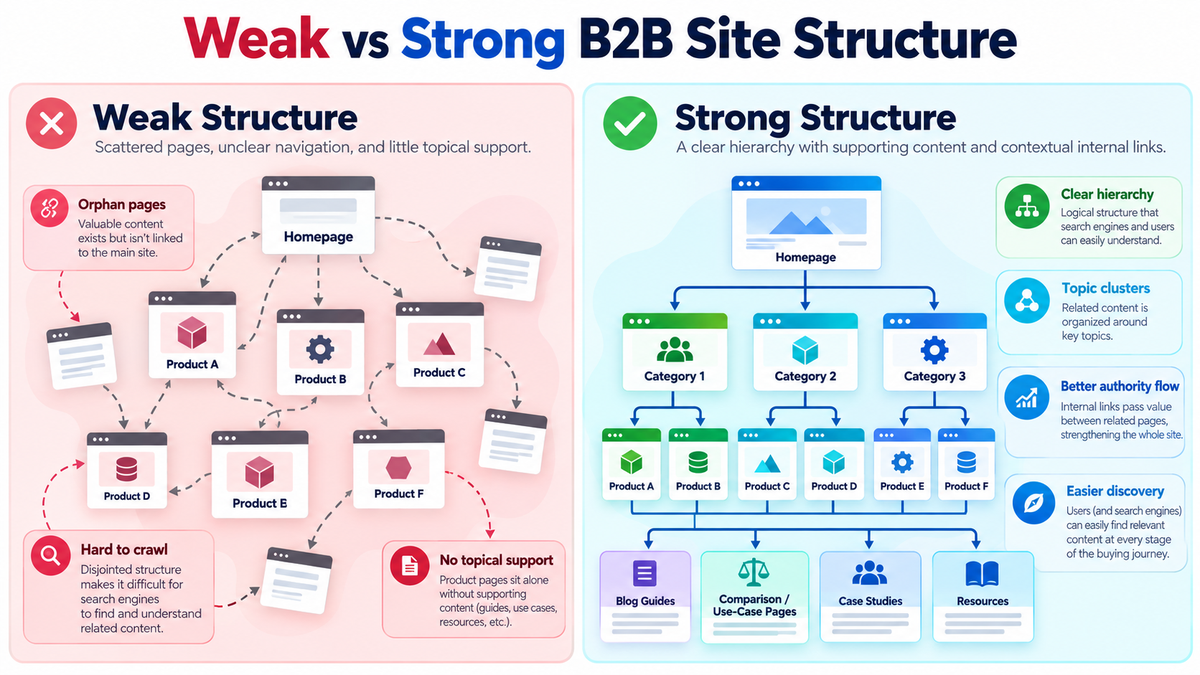
Improving these issues does not always require rebuilding the website. Adjusting navigation, consolidating duplicate content, and strengthening relevant internal links can make an existing B2B website more useful.
B2B Website Structure Checklist: What to Review Before Publishing
Before launching a new product page or redesigning an existing website, check whether the structure supports both buyers and search engines.
- Page purpose: Does every important product and solution page address a distinct customer need or search intent?
- Hierarchy: Does each commercial page have a logical place in the website?
- Navigation: Can visitors reach important products through relevant menus, categories, or internal links?
- Product content: Are benefits, features, specifications, use cases, and conversion options clearly explained?
- Supporting resources: Are relevant guides, comparisons, and case studies connected to the right products?
- Internal links: Do important pages receive descriptive, contextual links from appropriate pages?
- Linkable content: Does the website offer original or genuinely useful resources that other websites may want to reference?
- Technical SEO: Are important links crawlable, canonical URLs appropriate, and indexable pages included in the XML sitemap?
- Structured data: Is accurate, supported schema markup used where relevant, without assuming it guarantees rich results?
- Performance tracking: Are you measuring relevant organic traffic, product-page engagement, and qualified enquiries?
For an established website, start by identifying the pages most important to lead generation. Use Google Search Console to review organic search performance and a website crawler to identify broken links, orphan pages, and internal linking opportunities.
Then map the supporting content that should connect to those pages. Prioritize links that genuinely help visitors rather than attempting to send every article to the same commercial destination.
Conclusion
A successful B2B website needs more than well-designed product pages, useful articles, or backlinks considered separately. Its structure should help those elements work together.
The homepage introduces your business, solution pages organize related offerings, and individual product pages help buyers evaluate specific products. Educational resources attract people researching business problems, while relevant internal links connect that information to suitable commercial pages.
When external backlinks point to useful resources, a clear internal structure can help extend their potential value across related parts of the website.
For companies developing a new website or improving an existing one, Prarambh brings together website design, SEO, and content marketing to create more connected digital experiences.
Start with your highest-priority products, understand what buyers need to know, and organize your pages around those requirements. Once the structure is clear, content and backlinks can support a more coherent SEO strategy.