A business that sends proforma invoices
- Today. Proformas are typed outside Tally, or share a series with the real bills.
- With Takkada. Proforma Invoice gets its own name and number series in Tally, made from the phone.

Today a new kind of bill means a session at the Tally computer: the voucher type, its parent, its numbering, its prefix, and a check that no number collides with one used this year. Voucher names does it from Settings on the phone, and asks your staff which type to use when they start a bill.
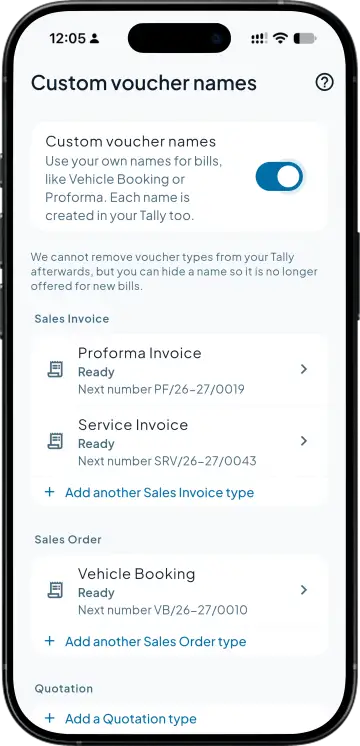
In Settings, Custom voucher names, pick the document, type the name and a number prefix, and the screen shows what the first one will be numbered: VB-1 for Vehicle Booking. Sales and purchase names can carry their own ledger.
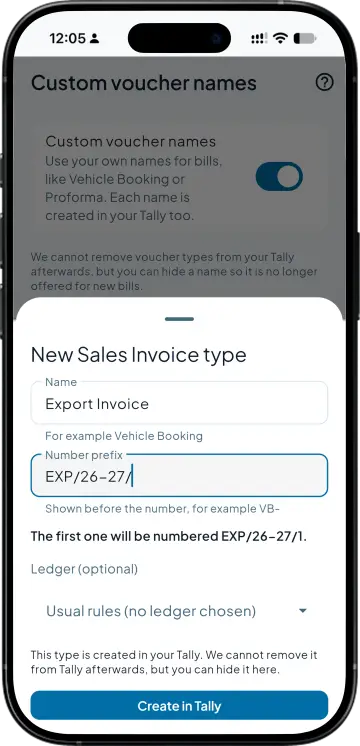
At the Tally computer this means Create, Voucher Type, then a parent, a numbering method and Prevent duplicates. Create in Tally does it for you under the base type for that document, even if you renamed the base, with manual numbering and duplicates prevented. The type stays switched on, so staff keying in Tally can use it too.
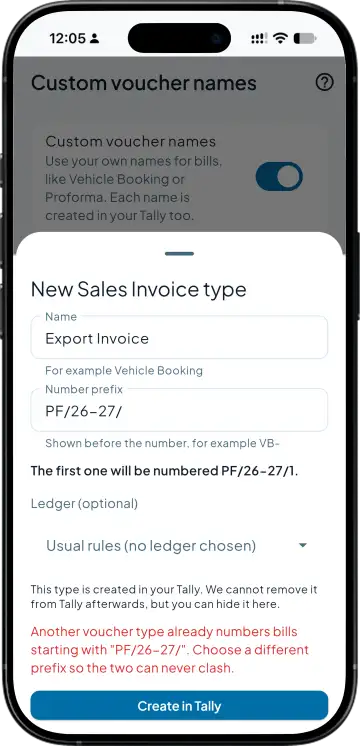
A prefix has to be unique and cannot clash with numbers your Tally vouchers already use this year. Rename a type and the numbers keep running: VB-1, VB-2, then VB-3 under the new name.
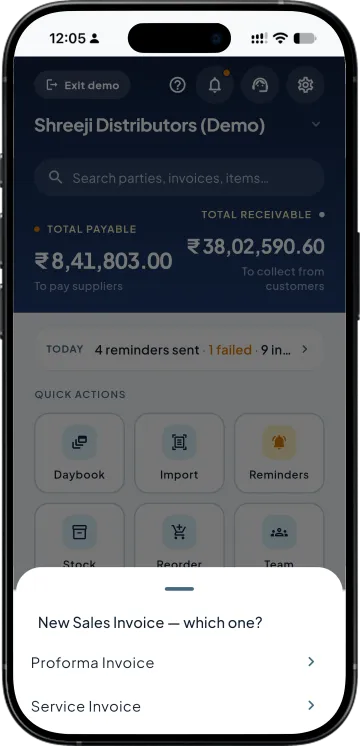
With one name for a document it is used on its own. With several, a new sales invoice asks which one. Lists show each bill's type with filter chips, and the PDF keeps Tax Invoice as its title with the type name printed under it.
| What you need | Tally with Takkada | Tally alone |
|---|---|---|
| Who can set up a new bill type | The owner or admin, from Settings on the phone, wherever they are. Takkada creates it in Tally. | Someone at the Tally computer, under Create, Voucher Type, who knows its settings. |
| Number series | A prefix per name, checked against the numbers your Tally vouchers already use this year. | Set inside the voucher type by whoever creates it, and checked for clashes by them. |
| Renaming | Once, in the app. Tally follows, old bills show the new name and the numbers keep running. | Altered in the voucher type at the Tally computer. |
| Staff using the right series | Asked which type when a bill is started, from the names you set up. | Told which type to pick, then picked in voucher entry at the Tally computer. |
Tally Prime has always let you add voucher types. Voucher names creates them from the app and keeps the app and Tally on the same names and the same series. A type, once made, stays in Tally; it can be hidden from new bills, never deleted.
Voucher names is an add-on, priced by your partner. Once it is enabled, the company admin switches it on in Settings.
Momentum ₹3,375/year + GST on a 3-year term
See what every plan includesIn Tally you add one under Voucher Types and choose its parent. With Voucher names on, the company admin does it from Takkada instead: Settings, Custom voucher names, a name and a number prefix, then Create in Tally. The type appears in Tally under the base type for that document.
Sales invoices, sales orders, quotations, delivery challans, purchase invoices, purchase orders, receipts, payments, credit notes and debit notes. Each can carry several names. Journals, contra, stock journals, goods receipts and expenses keep their usual voucher types.
Yes. Use a type already in your Tally brings it into the app, and Tally keeps its own numbering for it. Names created from the app get a prefix and a running number of their own instead, so the two never fight over a series.
Renaming changes the name in the app and in Tally, and the numbers carry on, with old bills showing the new name. Hide from new bills takes it off the list for new entries. Nothing is deleted from Tally, and a created type stays in Tally.
No. Numbering is your prefix followed by a running number from 1, with no suffix. The prefix is checked so it cannot clash with the numbers your existing Tally vouchers already use this year, which keeps duplicate bill numbers out of the books.
Book a demo. We walk through your setup, your Tally version, and exactly what changes for your business.