Scheme management for Tally. Buy 10 get 1 free, written once, applied on every bill that qualifies.
The company's scheme letter lives in the app, not in the salesman's memory. When a party's bill crosses the line, the free quantity or the slab discount is added by itself, and the month-end report says what each scheme cost.
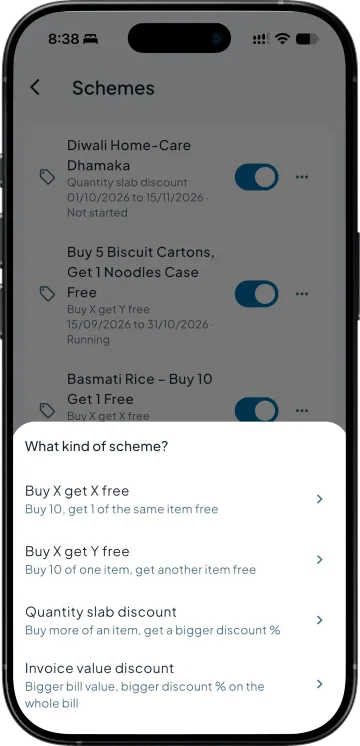
Scheme management for Tally in Takkada covers four kinds of billing-time offer: buy X get X free, buy X get Y free, quantity slab and invoice value discount. Each is set once with its items, parties and dates. The cart adds the free line or the slab percentage while the salesman bills, and a report totals what each scheme cost.
Buy X get X free. Buy X get Y free. Quantity slab discount. Invoice value discount. Name it, pick the items or a stock group, choose all parties, a party group or a picked list, and set the dates it runs. A switch turns it off without deleting it.
The cart applies it while the salesman types
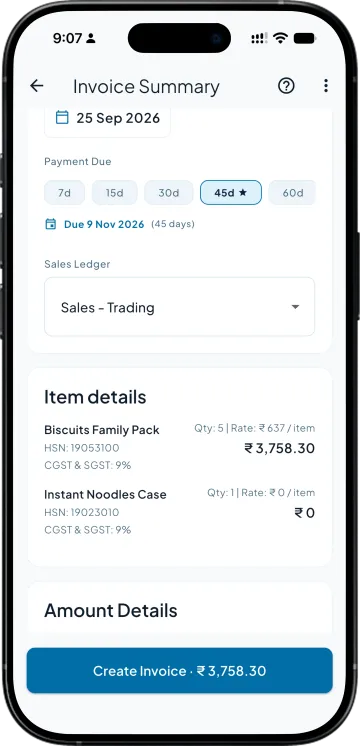
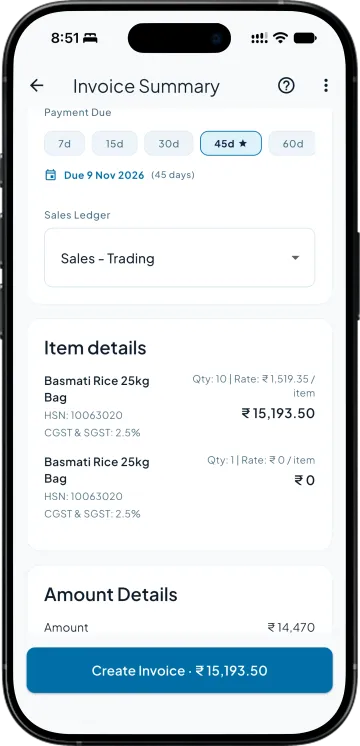
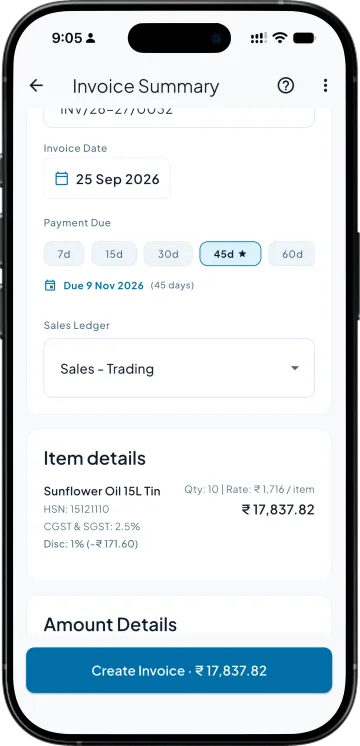
Quantity crosses 10 and a read-only free line appears under the item, marked Free, Buy 10 get 1. Quantity crosses a slab and the line reads Scheme: Slab 4% with the benefit shown on the line. Tap the tag to remove the scheme from this one invoice.
The Scheme cost report says what it cost
One row per scheme per party for any period: invoices, free quantity and the value given away. The total at the bottom is the number to put against the company's scheme claim.
SIDE BY SIDE
Schemes on the phone, against the scheme letter on the wall
What you need
Takkada
Tally on the office desktop
Free goods on a qualifying bill
Added as a zero-rate line the moment the quantity qualifies.
The salesman remembers, or the retailer reminds him.
Slab discounts by quantity or bill value
Slabs typed once; the right percentage lands on the line by itself.
A printed table and a discount typed by hand per line.
Which parties get it
All parties, a Tally ledger group, or a picked list, per scheme.
Whoever asks for it.
What the scheme cost this month
Scheme cost report, per scheme and party, with a total.
Free items hidden inside sales vouchers; a spreadsheet to find them.
Comparison describes a desktop-only Tally setup without a mobile companion. Your own workflow may differ.
Schemes is an add-on to any plan with invoice creation from the phone, which starts here. The add-on is priced on the demo call.
As its own line on the sales voucher, with the free quantity and a rate of zero, so stock moves out in Tally the way it left the godown. The line description names the scheme, Free under Buy 10 get 1, so anyone reading the voucher later knows why it is there.
No. The scheme is worked out on the server from the party, the date and the lines; the phone only shows the answer. He can remove a scheme from an invoice, and he cannot add one. The save is checked again against the running schemes before the voucher is written.
The line shows both by name, for example Scheme: Diwali + Festival. For a buy X get Y free scheme, the value of one free item is set when the scheme is written, and it is used only to compare schemes when more than one could apply to the same line.
Only on sales invoices. Orders and credit notes take no scheme pass, so a free quantity is never promised on an order that may be billed after the scheme ends, and a return never earns a free item or a slab discount of its own.
Nothing. Archiving stops the scheme applying to new bills and takes it off the list. Bills already made keep their free lines and discounts, and the Scheme cost report still shows them for the period they were billed in.
See it in 15 minutes. Decide with a full picture.
Book a demo. We walk through your setup, your Tally version, and exactly what changes for your business.