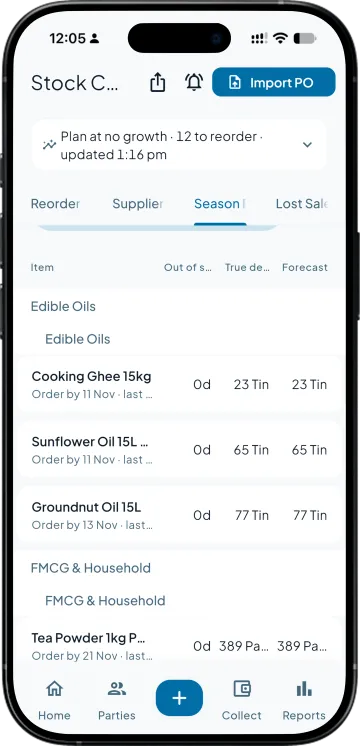
This week's purchase list, worked out before anyone walks to the godown.
The weekly order usually starts with the stock summary in Tally, a call to the godown and somebody's memory of which supplier takes twelve days, then each purchase order is keyed in line by line. Stock Control reads the same Tally books and hands you the list and the orders.
The items that will run out before a fresh order lands, without a godown call
Quantities from your own best month, minus stock and what is already ordered
Supplier delivery times measured from your own orders and receipts
One purchase order per supplier, filled in and saved to Tally
Today. The weekly order is built from the stock summary, a godown call and memory, and fast items still run out.
With Takkada. Reorder Now lists what will run out before a fresh order lands, and the basket turns it into one purchase order per supplier.
A business with a busy season
Today. Season stock is planned from last year's register by hand, often once the rush has started.
With Takkada. Season Plan reads last year's same months, corrects for the days items were out of stock, and gives each item an order-by date.
An owner tired of late suppliers
Today. Lead time is whatever the supplier promised on the phone.
With Takkada. Suppliers shows the days 9 in 10 of their orders really took, and the orders already past their promised date.
Work you stop doing
Building the reorder list from the stock summary and a godown call
Keying purchase orders into Tally line by line
Planning around the lead time a supplier promised
Reading last year's sales register by hand before the season
STOCK CONTROL
From this morning's stock to the supplier's order
The list nobody has to make
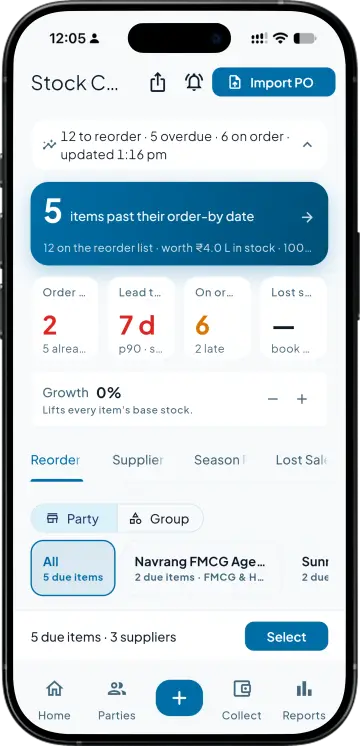
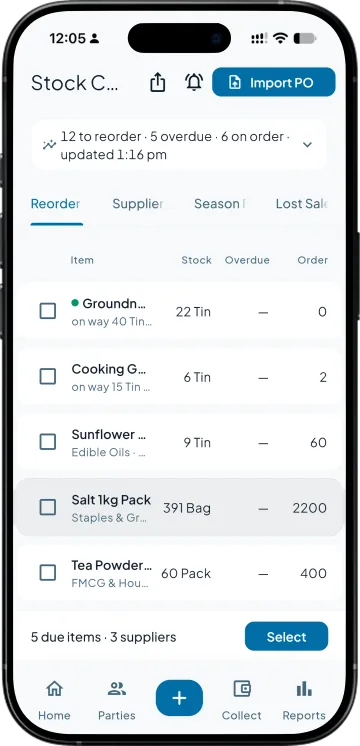
The top band reads Order this week, Lead time, On order and Lost sales. Below it is every item that will run out before a fresh order can arrive, most overdue first, with its stock, what is already on the way, the supplier lead time and a quantity to order. Nobody counts a shelf to build it.
Tick, check, create the order
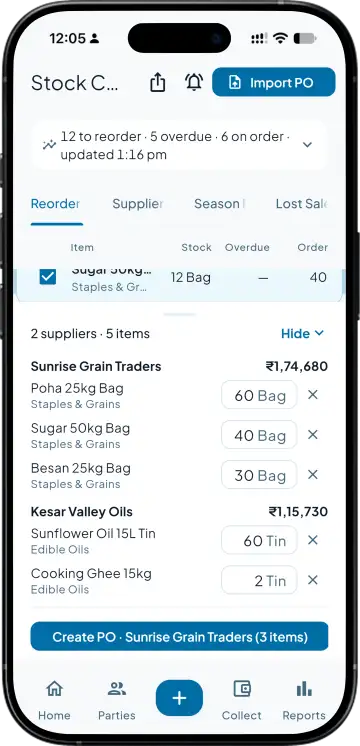
Tick items, or let one tap pick everything that is due. The basket groups them by supplier with the quantities open to change, and Create PO opens that supplier's purchase order filled in at the last purchase rate. Save it and it goes to Tally like any order, so nobody keys it again at the Tally computer.
Suppliers, judged on what they did
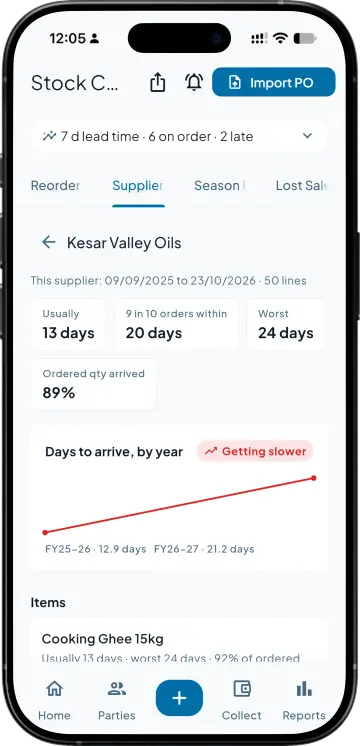
For every supplier: the days an order usually takes, the days 9 in 10 orders arrive within, the worst case, how much of what you ordered actually came, and the orders past their promised date. Year by year it shows who is getting faster or slower, measured from your own receipts.
A season plan with an order-by date
Pick a window, say November to February. The plan takes the items making up the top 80% of your sales, reads the same months last year, corrects for the days they were out of stock, and gives each one an order-by date. Dates already gone are flagged first.
SIDE BY SIDE
The weekly order, in Tally alone and with Takkada
What you need
Tally with Takkada
Tally alone
Which items to reorder
Listed each morning, most overdue first: the items that will run out before a fresh order arrives.
Read off the stock summary, then checked with a call to the godown.
How much to order
Topped up to your best month of the last twelve, lifted by the growth dial, minus stock and what is already on order.
Worked out by whoever places the order, against the reorder level on the item if somebody set one.
Supplier delivery time
Measured from your own purchase orders and receipts: usually, 9 in 10 within, worst.
Remembered, or taken from what the supplier said on the phone.
Season stock
Last year's same months, corrected for the days items were out of stock, with an order-by date per item.
Read off last year's sales register by hand, if there is time before the rush.
The purchase order
One per supplier, filled in from the basket at the last purchase rate, then saved to Tally.
Keyed into Tally line by line at the office.
Tally Prime's Reorder Status report works from the reorder level and minimum order quantity set on each item. Stock Control reads the same books and adds measured supplier lead times, a season plan and the purchase orders themselves.
Stock Control is an add-on, priced by your partner. Ask them for the add-on price.
No. Create PO opens the purchase order already filled in with the supplier, the items, the quantities from the basket and the last purchase rate where there is one. Whoever saves it checks it once, and it reaches Tally as an ordinary purchase order.
It finds each item's best month of sales in the last twelve full months and tops stock up to that level, lifted by the growth dial, after taking off what is in the godown and what is already on order. The quantity is rounded to a clean figure. An item with no such month falls back to its daily sales over the supplier's lead time.
From your own purchase orders and the goods receipts against them. For each supplier it shows the days an order usually takes, the days 9 in 10 orders arrive within, and the worst case. The more purchase orders you book, in Tally or in Takkada, the sharper those numbers get.
From the item's average daily sales, adjusted for the season, carried over the supplier's usual delivery time plus a month for your order cycle and a buffer for the slow deliveries. An item whose stock and stock on the way fall below it shows up in Reorder Now.
It lifts every suggestion by the same percentage, in steps of five, from minus fifty to plus fifty. Expecting ten percent more business, set it to ten and every base level and order quantity moves with it. Only the company admin can turn it; everyone else sees the setting.
Yes, when orders are booked as sales orders. Lost Sales counts an order line as lost when the next consignment arrived, the customer was billed again, and the item still was not on that bill. Lines that can still be filled sit apart as awaiting stock, and the screen says what share of your sales goes through orders.
Yes. Stock Control is the same screen in the phone app and on the web. Any of its four tabs exports to Excel exactly as it is on screen, with a supplier summary sheet and the full list, and the purchase orders it creates reach Tally as ordinary purchase orders.