A billing desk that queues for the Tally computer
- Today. Bills wait while the one computer running Tally is in use.
- With Takkada. A second person bills from any office computer with a browser, and every bill reaches your Tally.

Today billing waits for a seat at the computer that runs Tally, and an order a salesman took on his phone gets typed in again. Desktop Entry puts a Tally-style form in the browser, F8, Enter and Ctrl+A included, and each bill reaches your Tally through the same save the phone app uses.
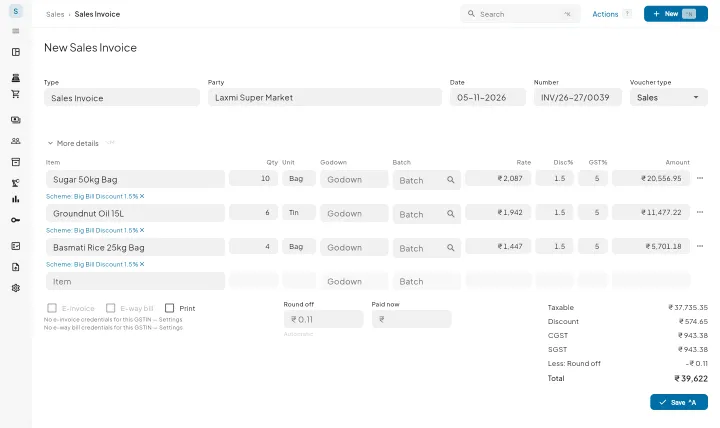
F8 lists the sales vouchers and F9 the purchase ones, Option 8 and Option 9 on a MacBook. Enter moves to the next field, Shift+Tab goes back, Esc backs out. F2 changes the date, and Alt+C makes a new party or item without leaving the bill.
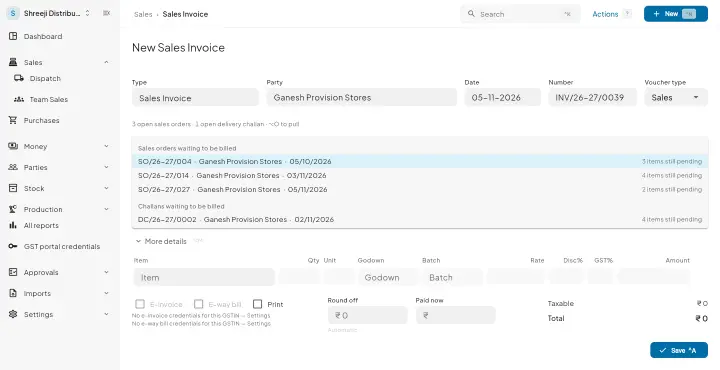
Alt+O brings in what is still pending on a sales order, challan, quotation, purchase order or goods receipt, so an order a salesman booked on his phone is never typed again. Only the open quantity is offered and it is checked again at save, so nothing is billed twice. Alt+2 copies the party's last invoice.
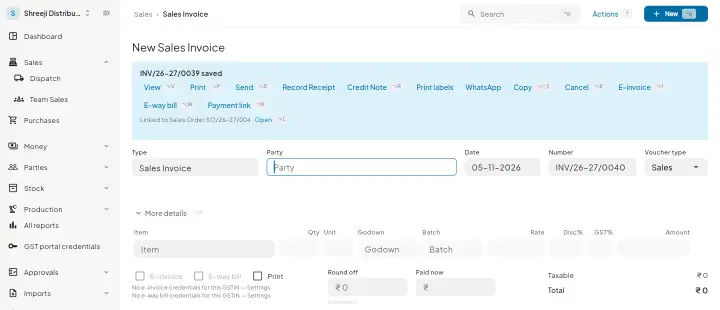
Ctrl+A saves. The form clears for the next bill and a strip shows the number just saved, with keys to view, print, send or cancel it, and a button for the next document, such as the receipt.
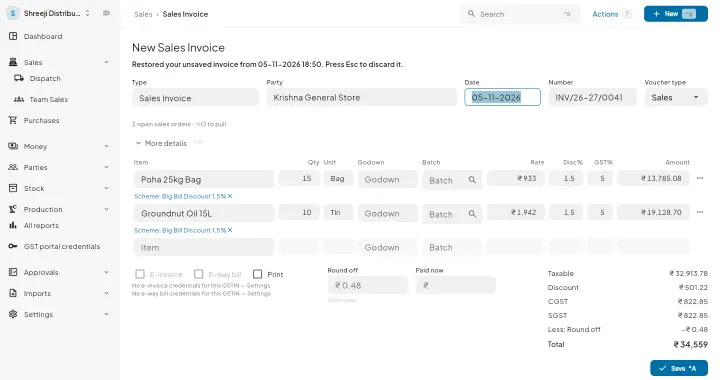
A desktop save runs the same save the phone runs, so numbering, approvals and the write into Tally behave the same. A half-typed bill survives a closed or crashed browser tab for seven days.
| What you need | Tally with Takkada | Tally alone |
|---|---|---|
| Where billing happens | Any computer with Chrome or Safari, a wide window and a mouse, at app.takkada.com. | At a computer running Tally, or over a remote session into it. |
| A second person billing | Bills at the same time from another computer, while Tally keeps running on its own. | Waits for the Tally computer, or works over a remote session into it. |
| An order booked on the phone | Pulled into the bill with Alt+O, only the quantity still open, checked again at save. | Typed in again from the salesman's message or slip. |
| Learning the screen | Nothing new: F8, F9, Enter, Esc, Ctrl+A and Alt+C work as they do in Tally. | Learned once, and usable only at the computer running Tally. |
Desktop Entry runs in the browser and writes to the Tally on your office computer through its connector, so that computer stays on. Web view, which comes with Assurance, shows the phone screens in a browser; Desktop Entry brings the computer layout and opens the browser by itself.
Desktop Entry is an add-on, priced by your partner. A company without it keeps the phone-style screens on every screen size.
Momentum ₹3,375/year + GST on a 3-year term
See what every plan includesNo. Desktop Entry runs in the browser at app.takkada.com, in Chrome or Safari, on the computers your billing staff already use. Tally keeps running on the office machine with the connector, and that is where each saved entry is written.
No. Web view lets you log in from a computer browser and shows the ordinary app screens. Desktop Entry is the computer layout itself: the sidebar, the wide registers and the keyboard entry form. A company with Desktop Entry does not need Web view switched on as well.
Enter moves to the next field and accepts, Shift+Tab goes back, Esc backs out and Ctrl+A saves, Control+A on a Mac. F8 and F9 switch between the sales and purchase vouchers, F2 changes the date, Ctrl+I inserts a line and Alt+C creates a party or item.
Quotations, sales orders, delivery challans, sales invoices, credit notes and receipts on the sales side; purchase orders, goods receipts, purchase invoices, debit notes and payments on the purchase side; and stock journals, expenses, contra and journal entries.
No. The phone app keeps its own screens. The computer layout shows only on a wide window with a mouse or trackpad, and only for a company with the add-on, so a phone or a narrow window never switches into it.
Book a demo. We walk through your setup, your Tally version, and exactly what changes for your business.