A distributor with vans on shop-to-shop drops
- Today. Signed bill copies come back in a bundle, some missing, and a dispute means hunting for one.
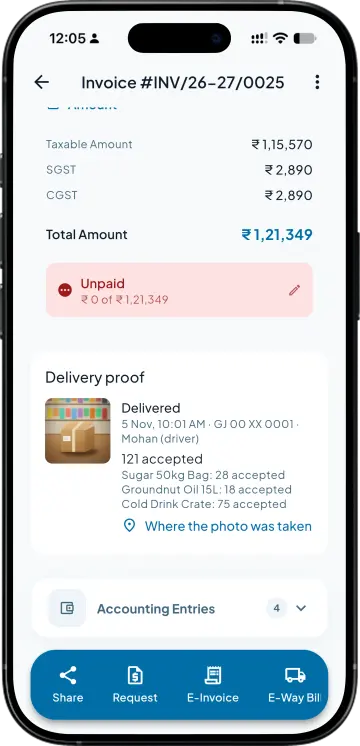
- With Takkada. Every drop carries a live camera photo with the time and place, shown on the invoice.

Most evenings run on signed bill copies, a bag of cash counted against a list, and one receipt per shop keyed into Tally. Proof of Delivery puts the photo, the returns and the cash on record at each drop, and the office approves the money into a Tally receipt.
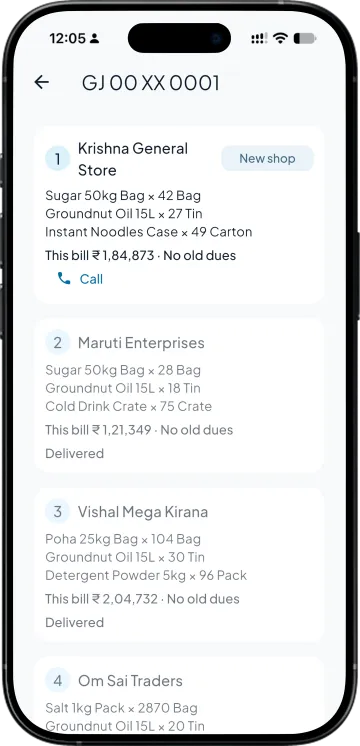
The driver logs in to My trips. A trip appears once the van is billed, with its shops in route order and Call and Navigate on each. Shops already pinned can be sorted nearest first from where he is standing.
Mark delivered needs a photo from the live camera, never the gallery, and it records the time and the place. Returned quantities take a reason such as damaged, wrong item or not ordered, and a shop he could not deliver to gets one too.
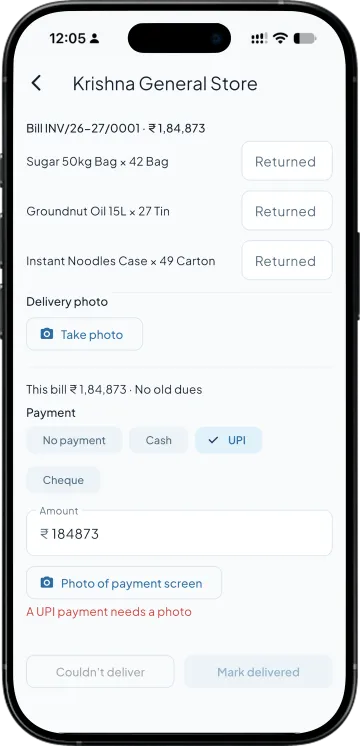
He records what the shop paid, against one bill or all of them oldest first. UPI and cheque need a photo of the screen or the cheque. The drop saves on the phone without signal and uploads when the van is back in range.
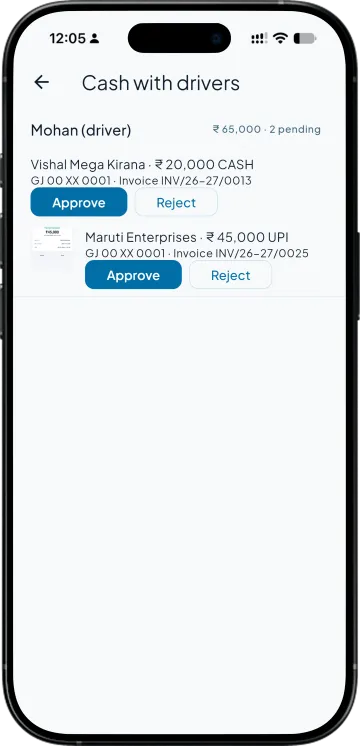
Cash with drivers lists each collection by driver, with the UPI screen or cheque photo beside it. Approve asks which account the money went into and makes the receipt in Tally against the bill, naming the driver and the trip, so nobody keys it. Reject asks for a reason. The invoice carries the photo, the time and the map pin.
| What you need | Tally with Takkada | Tally alone |
|---|---|---|
| Proof the goods reached the shop | A live camera photo with the time and the place, shown on the invoice. | A signed or stamped copy of the bill, if it comes back with the driver. |
| Cash collected on the van | Recorded per drop by the driver. One approval at the office makes the Tally receipt against the bill. | Counted against a list, then one receipt per shop keyed into Tally. |
| Returns | Quantity and reason per item, recorded at the shop and listed in the Returns report. The office still makes the credit note. | Told to the office in the evening, then the credit note is keyed in Tally. |
| A shop that was not delivered | Couldn't deliver, with the reason: shop closed, customer refused, no money, or the shop was not found. | Explained by the driver at the end of the day. |
| The driver's access | His own trips only. No registers, party balances or reports. | A printed copy of the day's bills. |
Returns are recorded for the office and listed in a Returns report; they do not post a credit note or stock entry to Tally. Deliveries are recorded in the phone app, and nothing reaches Tally until the office approves it.
Proof of Delivery is an add-on on top of Dispatch Load, which comes with Copilot. Ask your partner for the add-on price.
Copilot ₹6,750/year + GST on a 3-year term
See what every plan includesNo. The Driver role sees only his own delivery trips: the drops, the photos and the cash he collected. Registers, party balances and reports stay closed to him. A driver login uses a user seat like any other team member.
No. Mark delivered opens the live camera, and the photo records the time and the location it was taken at. The first photo at a shop also pins that shop's location, so later trips can sort the drops nearest first.
The office opens Cash with drivers, picks the account the money went into and approves. That makes a normal receipt in Tally, with a narration naming the driver and the trip. Until it is approved the cash is not in Tally, and a rejection has to carry a reason.
No. Returned quantities and their reasons are recorded and listed in the Returns report, so the office knows what came back, but nothing is posted to Tally for them. The credit note or stock entry is made as its own step.
Yes. A drop, its photo and the payment are saved on the phone and uploaded when the signal returns. Recording deliveries is a phone-app job; the browser shows the delivery proof on the invoice but does not record drops.
Members with full access, or the approvers you have set when voucher approvals are on. Each approval names the account the money went into, and each rejection carries a reason, so the trail still reads cleanly at month end.
Book a demo. We walk through your setup, your Tally version, and exactly what changes for your business.