Record production on the floor, and Tally gets the journals without anyone keying them.
Today the output goes on a slip, the godown gets a call before each batch, and the accountant keys every Manufacturing Journal, Material Out and Material In at the Tally computer. Takkada works from the BOMs already in your Tally, checks stock before a run and posts those vouchers from the phone.
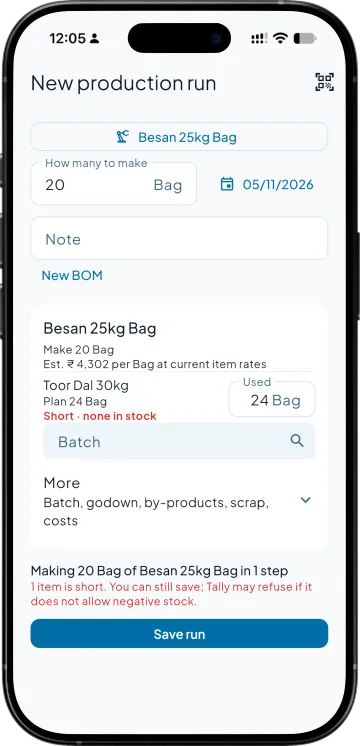
Components checked against the godown before a run, with shortages marked
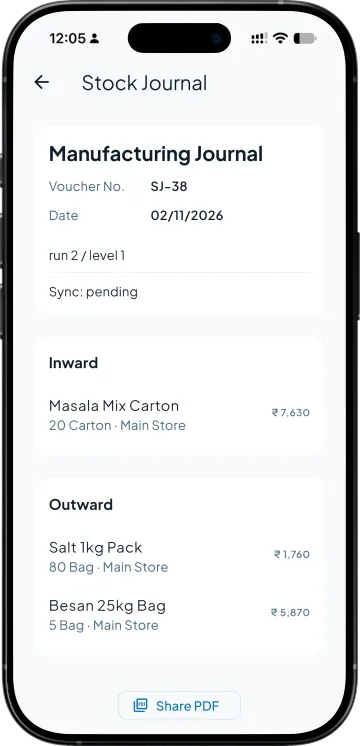
One run posts a Manufacturing Journal for each in-house level, in order
A production order received into stock with its item, BOM and quantity filled in
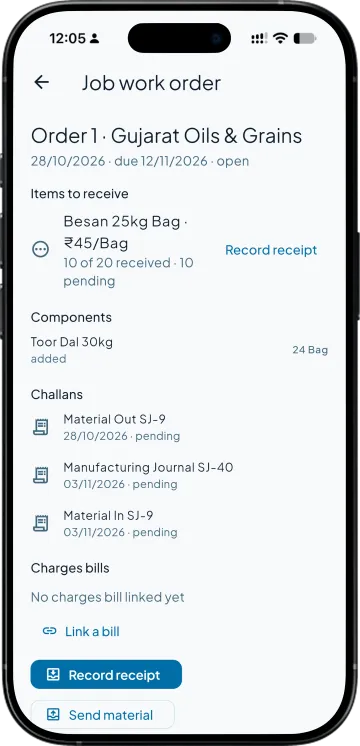
Job-work challans that start from the order, going out and coming back
Today. Output goes on a slip, and the accountant keys each Manufacturing Journal at the Tally computer.
With Takkada. Whoever runs the line records the run on the phone the day it is made, and the journals reach Tally.
A product made in stages
Today. One Manufacturing Journal per level, keyed by hand in the right order.
With Takkada. One run posts a Manufacturing Journal for each in-house level, in order.
A business that sends work to job workers
Today. Job Work Out Order, Material Out and Material In are each keyed with their items.
With Takkada. Material Out and Material In start filled from the job-work order, and the challan prints under Section 143.
Work you stop doing
Keying Manufacturing Journals from slips
Calling the godown before every batch
Keying job-work challans item by item
Keeping a whiteboard of what to make next
MANUFACTURING
From the BOM in your Tally to the journal in your Tally
The BOM your Tally already has
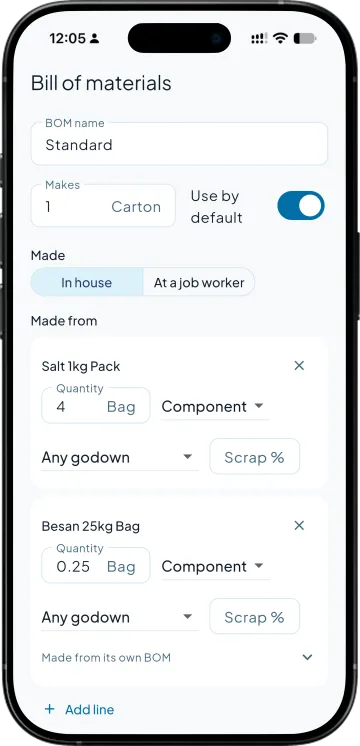
BOMs already set on your items in Tally come into the app, and a BOM edited in the app is written back to the item in Tally, so the office and the floor read one recipe. An item can carry several BOMs over as many levels as you make it in, and a line is a component, by-product or co-product with its own godown.
Stock checked before the batch starts
Pick what you are making and how many. Each component shows what is on hand and says Short when the godown cannot cover it, before anything is saved, so nobody calls the godown to ask. A run received from a production order opens with its item, BOM and the quantity still to receive already filled.
Every level becomes its own Manufacturing Journal
In Tally alone, a product made in three levels usually means three Manufacturing Journals, keyed in order. Save the run and each in-house level becomes one, components out and the finished item in. Here level 1 of run 2 is SJ-38, reading Sync: pending until your Tally computer takes it in; the run then marks the step In Tally with its number.
Job work out and back, nothing typed twice
Send material starts from the order's components, and Record receipt starts from what is still due, with the components used worked out in proportion. The challan prints under Section 143 of the CGST Act. The Job Work Out Order, Material Out and Material In then reach Tally in that order.
SIDE BY SIDE
A week of production, in Tally alone and with Takkada
What you need
Tally with Takkada
Tally alone
Recording what was made
On the phone, by whoever runs the line, the day it is made.
Written on a slip, then keyed at the Tally computer as a Manufacturing Journal.
A product made in levels
One run. A Manufacturing Journal per level goes to Tally in order, stopping at the first failure.
One Manufacturing Journal per level, keyed by hand in the right order.
Enough components for the batch
Each component shows On hand, and Short when the godown cannot cover it, before the run is saved.
Checked with a call to the godown before the batch starts.
Planning the work
Production orders with due dates, requests from the team and rejects reported. Receiving one opens the run already filled.
A whiteboard or a sheet kept beside Tally.
Job work out and back
Material Out and Material In start filled from the job-work order, and the challan prints under Section 143.
Job Work Out Order, Material Out and Material In, each keyed with its items.
The bill of materials
The same BOM, read from your Tally. An edit made in the app goes back to the item.
Set on the stock item at the Tally computer.
Takkada posts into the Manufacturing Journal voucher type your Tally already has and does not create one. Job work you do for a principal stays in the app and is not sent to Tally, and a journal or challan already in Tally is not changed from the app.
Manufacturing is an add-on, priced by your partner. Its phone screens come with it; the wide computer layout is the separate Desktop Entry add-on.
With the Manufacturing add-on on, open Production from the home screen and start a new run: pick the item, its BOM and how many to make. When you save, each in-house step goes to Tally as a Manufacturing Journal, the same voucher your accountant would have keyed at the office.
Yes. Takkada posts into the Manufacturing Journal voucher type your Tally already has and does not create one. If your company has never used it, your accountant or partner sets it up once in Tally before the first run.
Yes. A BOM line can be a component, a by-product or a co-product, each with its own godown, and a component can carry a scrap percentage and name the item the scrap goes into. An item can have several BOMs, one of them the default.
Yes. The Explosion view lists every raw material for any quantity you type, with an estimated cost at current item rates. Tally works out the real cost when the run is posted, so read the estimate as a planning number.
Job work out does: the job-work order, the Material Out when material leaves and the Material In when it comes back go to Tally in that order. Job work you do for a principal is recorded in the app but is not sent to Tally.
Set up the Manufacturing Journal voucher type once, keep the Tally computer and its connector running so the journals land, and cancel a journal in Tally if a run was wrong. The journals, job-work vouchers and BOM edits arrive from the app without anyone keying them.
No. Once a run, a job-work order or a challan is in Tally, the app will not change it. If a run was wrong, cancel its journal in Tally and record the run again in the app, so both sides tell the same story.
See it in 15 minutes. Decide with a full picture.
Book a demo. We walk through your setup, your Tally version, and exactly what changes for your business.