An owner who checks big entries before they count
- Today. The accountant reads the voucher out on the phone and waits for a yes.
- With Takkada. You see the party, amount and ledger lines on the phone and post it with one tap.

Today the accountant marks a voucher optional in Tally, reads it out to you on the phone, waits for your word, then opens it again and makes it regular. Tally Drafts lists those vouchers on your phone, and one tap turns the same voucher regular in Tally.
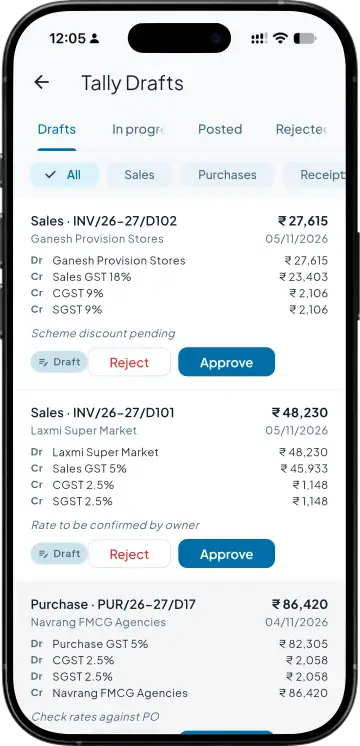
Tally Drafts opens on four tabs: Drafts, In progress, Posted and Rejected. Chips narrow it to sales, purchases, receipts, payments, notes, journals, contra, stock, challans, goods receipts or purchase orders, for this financial year unless you ask for older.
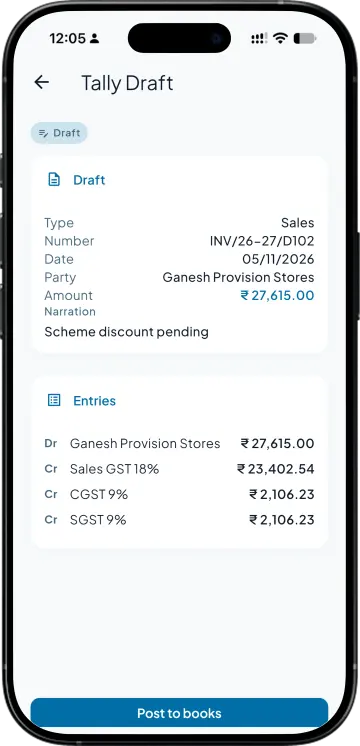
Each draft shows the voucher type, party, amount, date, the debit and credit ledger lines and the narration. If the accountant changes it in Tally after you looked, the post stops and the new figures are shown.
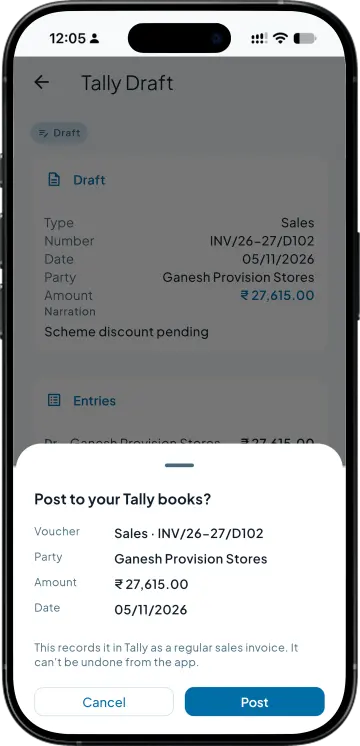
Approve on the list posts it in one tap; Post to books on the detail asks first. The same voucher in Tally turns regular, with no second copy made, and nobody opens it again at the Tally computer. A posted draft cannot be undone from the app.
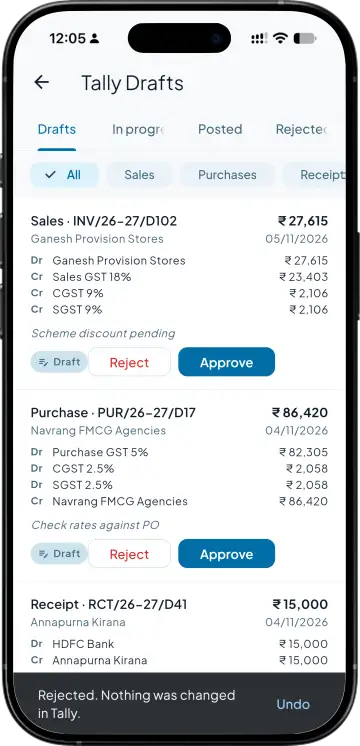
Reject only sets it aside in the app, with Undo offered, and Tally stays as it was. Posting follows your team permissions: a member sees only the voucher types they may view and posts only the ones they may create.
| What you need | Tally with Takkada | Tally alone |
|---|---|---|
| Seeing pending drafts | A list on the phone, by voucher type and status. | The Optional Vouchers report at the Tally computer, or a call from the accountant. |
| Checking one | Party, amount, ledger lines and narration, on the phone. | Opened in Tally, or read out over the phone. |
| Posting one | One tap. The same voucher turns regular in Tally, with no second copy. | Opened in Tally again, marked regular and saved. |
| Who can post | Set per voucher type, with approvals if you use them. | Whoever has the Tally login. |
| Rejecting one | Set aside in the app with Undo, and nothing changes in Tally. | Deleted in Tally, or left sitting in the Optional Vouchers report. |
Optional vouchers are a Tally Prime feature. Takkada reads them and posts them; it never creates or edits a draft, and item lines are not shown.
Tally Drafts is an add-on, priced by your partner. Posting needs your Tally machine and its sync running.
Momentum ₹3,375/year + GST on a 3-year term
See what every plan includesA voucher marked optional is saved in Tally but kept out of the books: it changes no ledger balance or stock until somebody makes it regular. Accountants use it for entries waiting on a check, a bill or the owner's word. Takkada calls these drafts.
In Tally you open the voucher, mark it regular and save it. From Takkada you tap Approve on the draft, or Post to books on its detail, and the same voucher turns regular in Tally. Nothing is entered twice, and the entry then counts in the books like any other.
No. Reject only moves it to the Rejected tab in Takkada, with Undo offered. The voucher stays optional in Tally. If the accountant edits it there later, it comes back to the Drafts tab so it can be checked again.
It follows the permissions you already set. A member sees drafts only for the voucher types they are allowed to view, and posting needs permission to create that type, plus an approver if approvals are switched on for it.
Yes. Post-dated drafts, and drafts of a voucher type Takkada has not been set up for, stay in Tally to be posted there. Item lines are not shown on the phone, so a stock draft points you to Tally for its items.
Book a demo. We walk through your setup, your Tally version, and exactly what changes for your business.