A distributor supplying chains and modern trade
- Today. Their purchase desk wants invoices by email, sent by hand from the Tally computer.
- With Takkada. The invoice PDF goes by email with each automatic WhatsApp send, with nobody at the office.

The purchase desk of a chain reads email before WhatsApp, and today each invoice, reminder and statement it wants is e-mailed by hand from the Tally computer. With Email on, the invoice PDF, the reminder and the statement that go out on WhatsApp reach the inbox too, from the same automatic send.
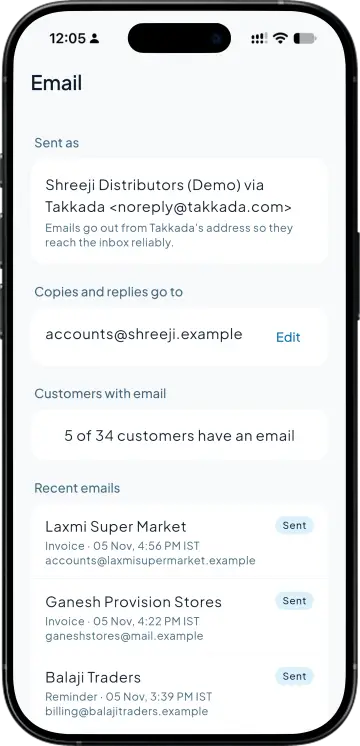
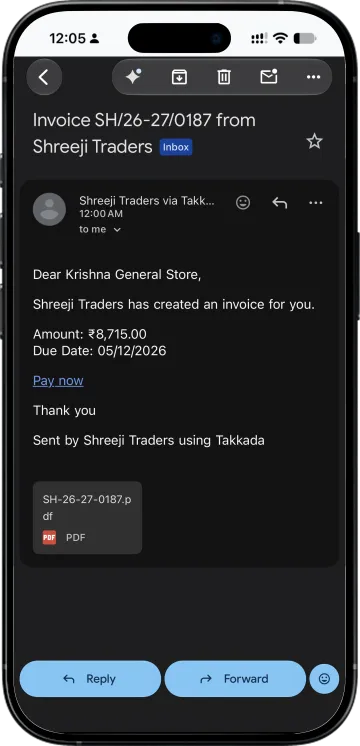
When Auto Invoice Dispatch sends an invoice on WhatsApp, the same invoice goes by email with the PDF attached. It is sent as your company name via Takkada, and a copy goes to your business email.
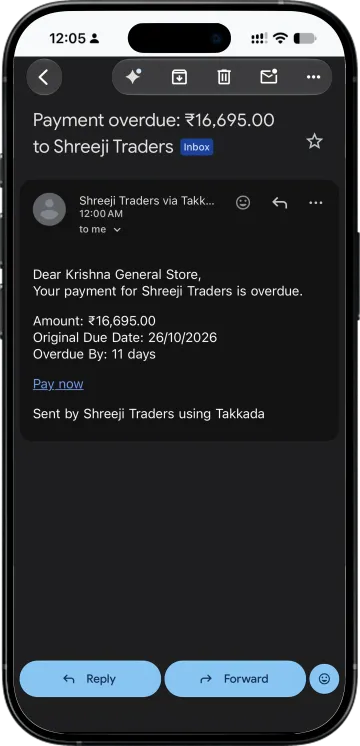
Due and overdue reminders and ledger statements carry the same words as the WhatsApp message, plus a Pay now link. If the WhatsApp message fails or the number has blocked you, the email still goes.
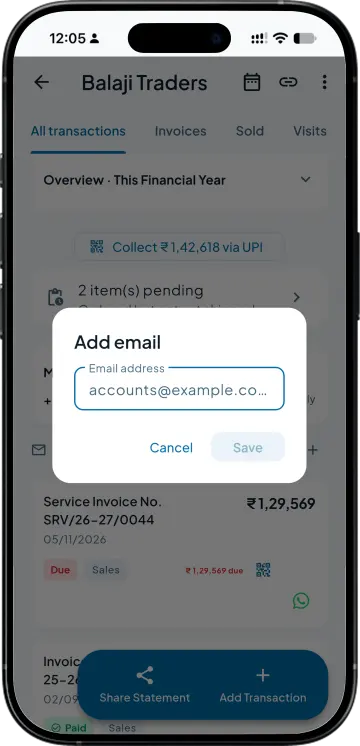
Takkada reads the email on the party ledger in Tally. If one is missing, add it on the party's Email card in the app; it is written back into Tally, so the next sync keeps it.
Settings, Email shows the name it is sent as, where copies and replies go, how many of your customers have an email address, and the emails sent most recently.
| What you need | Tally with Takkada | Tally alone |
|---|---|---|
| Sending the invoice | Automatic, with the WhatsApp send from Auto Invoice Dispatch, PDF attached. | E-mailed from the voucher by somebody at the Tally computer, once mail is set up there. |
| Reminders and statements | Each scheduled reminder and statement, emailed with a Pay now link. | Sent by hand from the office. |
| Who has to be at the office | Nobody. The email goes with the automatic WhatsApp send. | Somebody at the Tally computer, for every email. |
| A customer who misses WhatsApp | The email still goes, even if the WhatsApp message fails or the number has blocked you. | Followed up by phone once somebody notices. |
Tally Prime can e-mail a voucher once mail is set up on the Tally machine. Takkada sends from its own mail server as your company, so nothing is set up in Tally.
Email is an add-on, priced by your partner. Invoice emails ride on Auto Invoice Dispatch, which comes with Assurance; reminder and statement emails go out with the reminders.
Assurance ₹4,860/year + GST on a 3-year term
See what every plan includesYes, with the Email add-on and Auto Invoice Dispatch both on. Each invoice that goes out on WhatsApp is also emailed, with the PDF attached, to the address on the party's Tally ledger. One send makes at most one email, so a retry never doubles it.
The email on the party ledger in Tally, the first valid one if there are several. You can also add one on the party's Email card in the app; it is written back into Tally and survives the next sync. A party without an email simply gets WhatsApp.
It is sent as your company name via Takkada, from a Takkada no-reply address. Reply-To is the business email in your seller details, and that address gets a copy of every email, so a customer's reply lands with you.
Not today. Email goes out with the automatic sends: invoices through Auto Invoice Dispatch, and reminders and statements with their WhatsApp message. An invoice shared by hand on WhatsApp is not emailed, and receipts and credit notes are not emailed.
The email travels with the WhatsApp send, so the party needs a valid mobile number in Tally for anything to go out. If the WhatsApp message then fails or is blocked, the email still goes.
Book a demo. We walk through your setup, your Tally version, and exactly what changes for your business.