The month's salary worked out on the phone, and one balanced entry made for your Tally.
Running payroll in Tally alone means pay heads, attendance entries and a payroll voucher on the office computer, or an Excel sheet and a journal typed in by hand. The Staff and Payroll add-on works the salary out from the attendance your staff and managers mark, and makes the entry for the Tally you already keep.
Salary worked out from attendance, overtime, fines and advances
Your own Tally ledgers for salary, PF, ESI, PT and advances, or new ones made for you
One balanced salary entry each month, plus entries for advances, loans and bill paybacks
A Waiting for Tally mark until each entry reaches Tally
Today. Salary added up in Excel, and the journal typed into Tally on the accountant's next visit.
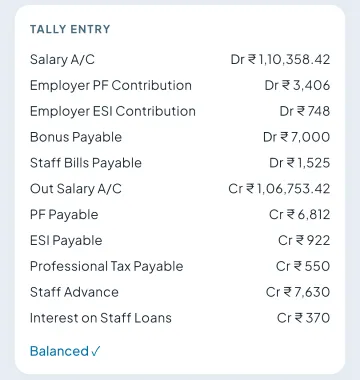
With Takkada. The salary entry made from the confirmed month, shown line by line for the accountant to check.
A business that tried Tally's payroll and stopped
Today. Pay heads and attendance entries had to be kept on the office computer, so the register came back.
With Takkada. Attendance marked on the phone, salary worked out, and the salary entry made for the same company's Tally books.
A distributor whose salesmen take advances against salary
Today. Advance payments in Tally, and the recovery worked out by hand at month end.
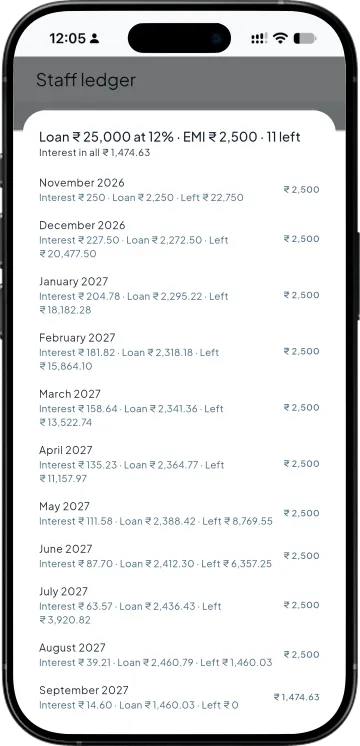
With Takkada. Advances and loan EMIs taken back in the salary run and shown in the month's entry.
Work you stop doing
Typing the salary journal line by line
Matching the Excel total to the Tally entry
Working out advance recovery by hand
Creating PF, ESI and PT ledgers one by one
PAYROLL FOR TALLY
From confirmed salary to the entry for Tally
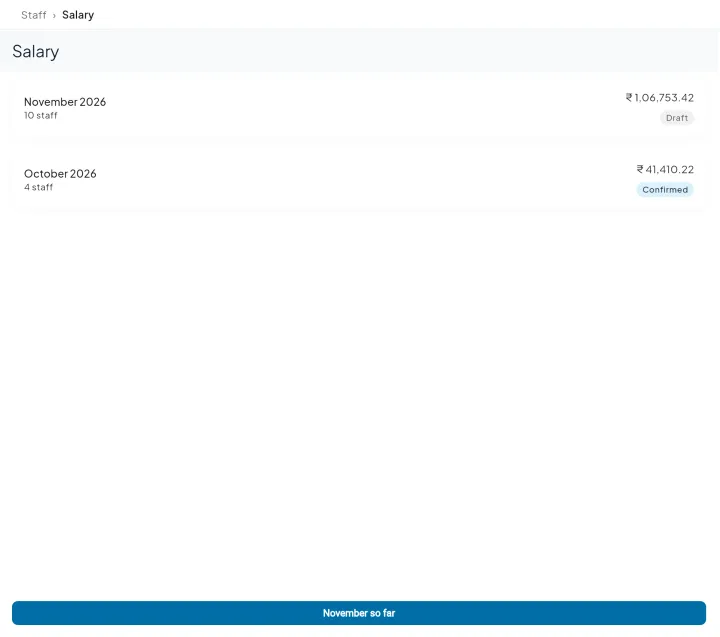
This month's draft, last month locked
The Salary page shows this month's draft for everyone and the months already confirmed. Open salary so far at any time and confirm on the last day. The owner and the accountant can run it from the phone or from a computer.
Your ledgers, or new ones
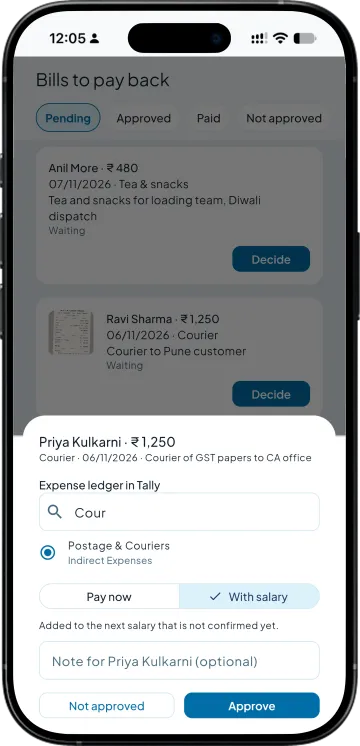
Pick the Tally ledgers you already use for salary, PF, ESI, professional tax and advances, or let the app create them. The same ledger choice comes up when you approve a staff bill, where you pick the Tally expense ledger it goes to.
One balanced entry for the month
The confirmed month becomes one salary entry for Tally, debit and credit shown balanced before it is sent through Takkada's Tally connector. The app shows Waiting for Tally until it arrives.
Advances and loans in the same books
Advances and loans get their own entries, and the salary run takes back what is due, with the EMI, interest and balance left for every loan.
SIDE BY SIDE
Salary in Tally alone, and with Takkada
What you need
Tally with Takkada
Tally alone
Attendance
Marked on the phone each morning by a manager, or punched in by staff.
Attendance entries kept on the office computer, or a paper register.
Salary working
Worked out from attendance, overtime, fines and advances, line by line.
Pay heads set up once, or an Excel sheet each month.
The salary entry
One balanced entry made for Tally each month and sent through Takkada's Tally connector.
A payroll voucher or journal entered at the office.
Advances and loans
Recovered in the salary run, with an EMI table for loans.
Recovery worked out and entered by hand.
Staff bills
Approved to a Tally expense ledger, paid now or with salary.
Collected as paper, entered as a payment later.
Staff self-service
Staff see their own payslips, attendance, leave and ledger.
Payslips printed or sent from the office.
The PF, ESI, professional tax, labour welfare fund and income-tax rates in the app are worked out from the rates it holds and are not yet checked by a CA; have your CA check the figures before you pay or upload them. TallyPrime has its own payroll with pay heads, attendance vouchers and payroll vouchers. Takkada does not use Tally's pay heads; it makes the salary entry as an accounting voucher in the ledgers you pick.
Staff and Payroll is an add-on, priced by your partner. Ask them for the add-on price, or message us and we will switch it on for your company.
No. The Staff and Payroll add-on works the salary out in Takkada and makes the salary entry as an accounting voucher in the ledgers you pick, so Tally's pay heads and payroll vouchers are not needed. If you already use Tally payroll, talk to your accountant before running both.
You choose. Pick the Tally ledgers you already use for salary, PF, ESI, professional tax and staff advances, or let the app create new ones, and every entry uses that choice from then on.
Once you confirm the month, the app makes one balanced salary entry and sends it through Takkada's Tally connector, the same way Takkada sends invoices and receipts. Until it arrives the salary month shows Waiting for Tally.
Yes. Giving an advance or loan, and paying back a staff bill, each make their own entry for Tally, and the salary run takes back the advance or EMI that is due that month.
Yes. The Tally entry is shown on the salary month with every debit and credit line and a balanced mark, so your accountant can read it before you confirm. Statutory lines are worked out from the rates in the app, for your CA to check.