A business whose CA files PF and ESI
- Today. Wages and days sent to the CA on WhatsApp, then typed again into the formats.
- With Takkada. The ECR file and ESI sheet prepared from the confirmed month and handed to the CA.

Every month someone copies each person's wages and days into the EPFO and ESIC formats by hand. The Staff and Payroll add-on prepares those files from the salary you confirmed, and works out professional tax, labour welfare fund and TDS on salary for your CA to check.
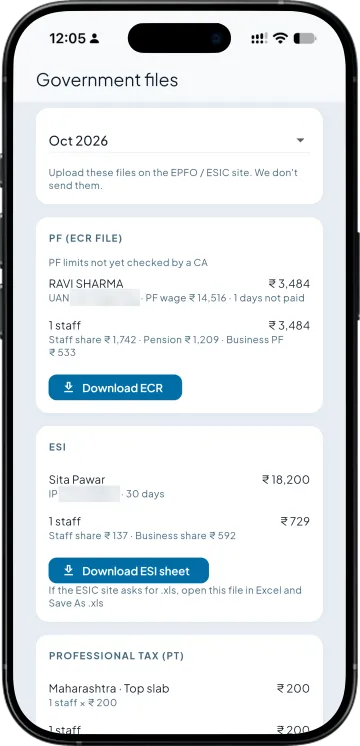
The Government files screen prepares the month's PF ECR text file and ESI sheet from confirmed salary, with PT and LWF totals. The screen tells you to upload them on the EPFO and ESIC sites, because the app does not send them. If the ESIC site asks for .xls, save the sheet in that format.
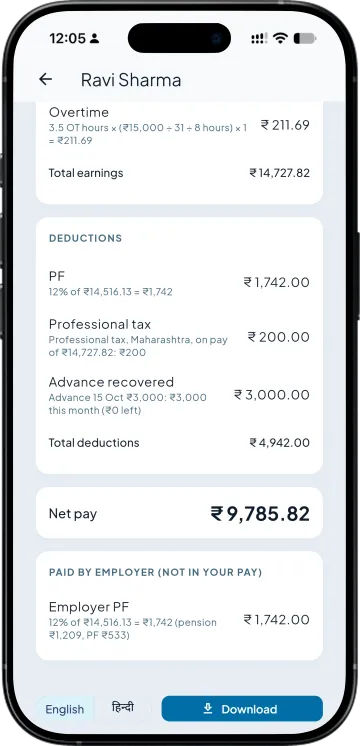
PF with the pension (EPS) split, ESI, professional tax and labour welfare fund are cut from pay and shown on the slip, worked out from the rates in the app for your CA to check.
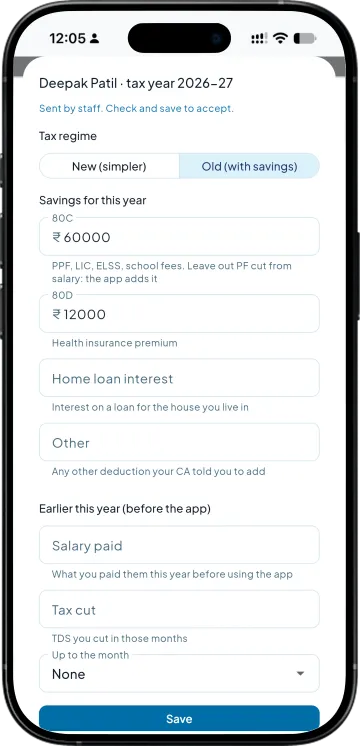
Staff send their 80C, 80D and home loan declarations from their phone. You check and accept them, and TDS on salary is worked out every month under the new or old regime, for your CA to check.
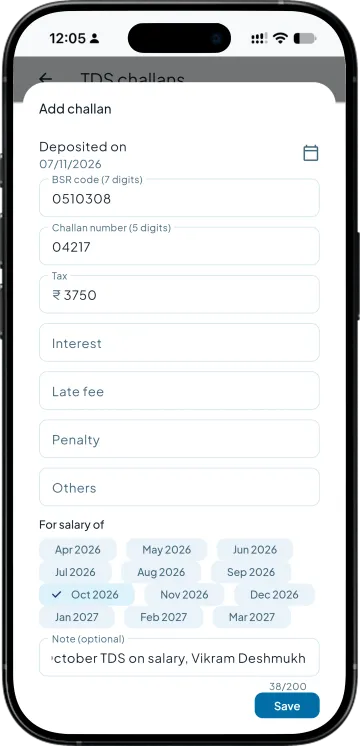
Record each TDS challan from the bank receipt. Each quarter the app prepares the TDS statement data for your CA: a text file for Q1 to Q3 and an Excel sheet for Q4.
| What you need | Tally with Takkada | Excel and Tally |
|---|---|---|
| PF ECR | Text file prepared from confirmed salary, for you or your CA to upload. | Built in Excel from the salary sheet. |
| ESI | Sheet prepared from the same figures. | Typed into the ESIC format. |
| PT and LWF | Cut on every slip and totalled for the month. | Worked out separately. |
| TDS on salary | Worked out every month, new or old regime, for your CA to check. | Worked out once a year, often in March. |
| Quarterly TDS data | Text file for Q1 to Q3, Excel for Q4, for your CA. | Collected by the CA from scratch. |
The PF, ESI, professional tax, labour welfare fund and income-tax rates in the app are worked out from the rates it holds and are not yet checked by a CA; have your CA check the figures before you pay or upload them. Uploading is done by you or your CA on the EPFO and ESIC sites; the app does not upload or file anything. Form 130 (earlier Form 16) is issued from TRACES; the app gives a yearly Salary and tax statement PDF with the figures behind it.
Staff and Payroll is an add-on, priced by your partner. Ask them for the add-on price, or message us and we will switch it on for your company.
Momentum ₹3,375/year + GST on a 3-year term
See what every plan includesThe ECR (electronic challan cum return) is the monthly file an employer uploads on the EPFO site, listing each member's wages and PF and pension contribution. The Staff and Payroll add-on prepares it as a text file from the salary you confirmed.
No. It prepares the PF ECR file and the ESI sheet for you or your CA to upload on the EPFO and ESIC sites, and the screen says so. Uploading and paying stay with you.
The app works them out from the rates it holds and shows every line on the slip so your CA can check it. The ESI rates have been checked; the PF wage-ceiling option, professional tax and labour welfare fund rates are not yet CA-checked, and the app says so on screen.
It holds professional tax for Maharashtra, Karnataka, West Bengal, Gujarat, Telangana, Andhra Pradesh and Assam, and labour welfare fund for Maharashtra and Karnataka. These rates are not yet CA-checked, so have your CA check the first month.
No. Form 16 is now Form 130 and is issued from TRACES. The app gives each staff member a yearly Salary and tax statement PDF and prepares the quarterly TDS data (Form 138, earlier Form 24Q) for your CA.
Book a demo. We walk through your setup, your Tally version, and exactly what changes for your business.