A two-wheeler showroom
- Today. Chassis and engine numbers are copied from the register onto each bill, and one wrong digit means a corrected bill.
- With Takkada. The vehicle is picked from stock, and its numbers print from its own details.

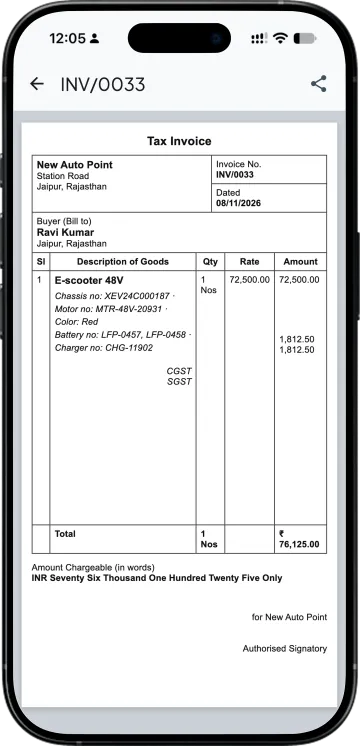
A two-wheeler or e-rickshaw bill carries the chassis number and the engine or motor number, and the clerk usually copies them from a register into the bill. With the Custom Fields add-on, each vehicle keeps its own numbers from the day it is bought or built, and picking it on the bill prints them.
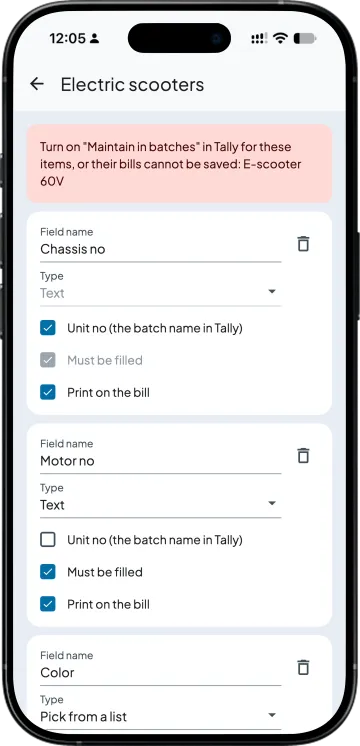
On the vehicles' stock group, make the chassis no the Unit no and add motor no, colour and battery no, marking which must be filled and which print on the bill. Turn on "Maintain in batches" for those items in Tally. On the purchase or goods receipt, each vehicle gets its own row.
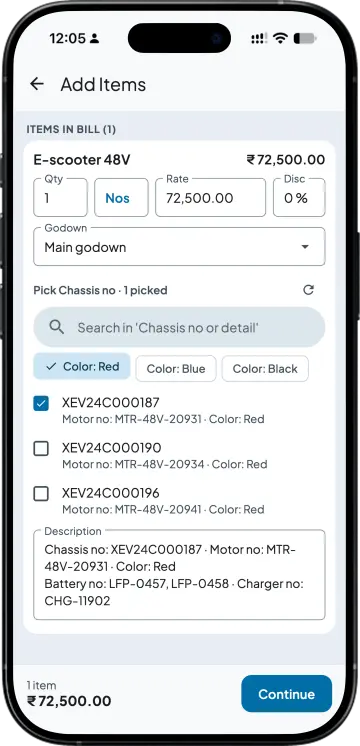
The sales order, challan or invoice lists only the vehicles still in stock in that godown; tap "Color: Red" to narrow it. A vehicle picked on a sales order is held for that customer. No chassis is sold twice in Takkada: the bill is refused, naming the bill that holds it, and a sale typed straight into Tally is matched after Takkada syncs.
Chassis no, motor no, colour and the numbers of the parts inside, such as Battery no and Charger no, print under the item on the sales invoice and challan. The sale goes to Tally through Takkada with the chassis no as the batch and the details in the item's description lines.
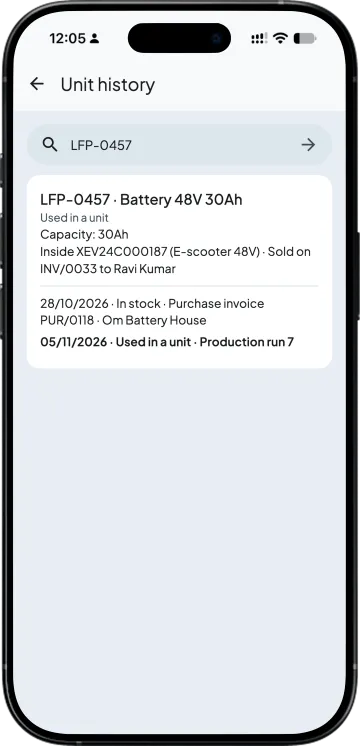
With the Manufacturing add-on, a production run gives each finished vehicle its chassis no and details, and you pick the parts that go into it, any number, like two batteries and a charger; a part used in one vehicle cannot go into another. This covers in-house production, not job work. Unit history then finds any battery or chassis no with every bill.
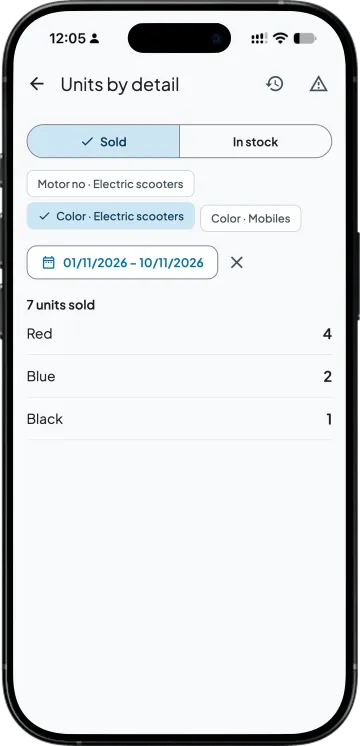
Units by detail counts vehicles sold or in stock by colour or any field, and a battery that went out inside a sold scooter counts as sold too.
| What you need | Tally with Takkada | Register and Tally |
|---|---|---|
| Where the numbers are kept | With each vehicle in Takkada; the chassis no is the Tally batch. | A register or Excel, copied onto each bill. |
| Billing a vehicle | Picked from vehicles still in stock in that godown. | Chassis no read off the register and typed. |
| On the bill | Chassis no, motor no, colour and battery numbers print under the item. | Typed into the item description. |
| A booked vehicle | Held for that customer when picked on the sales order. | A note in the booking register. |
| Batteries in each vehicle | Linked in the production run, with the Manufacturing add-on. | A shop-floor notebook. |
| The same chassis twice | Refused in Takkada, naming the bill that holds it. | Found later. |
Turn on "Maintain in batches" in Tally for these items. Production runs need the Manufacturing add-on and cover in-house production, not job work. A sale typed straight into Tally is matched after Takkada syncs, not blocked.
Custom Fields is an add-on, priced by your partner. Ask them for the add-on price, or message us and we will switch it on for your company.
Momentum ₹3,375/year + GST on a 3-year term
See what every plan includesIn Tally Prime they usually go in the description lines under the vehicle, typed on every bill, or the chassis number is used as the batch name. With the Custom Fields add-on the chassis no is the batch, and picking the vehicle fills its engine or motor number, colour and battery numbers into the description lines for you.
The sale certificate in Form 21 asks for the vehicle's chassis number and its engine number, or motor number for a battery-operated vehicle. Keeping the same numbers on your invoice keeps the papers consistent; check the exact requirement with your RTO agent or CA. In Takkada the numbers print from the vehicle's own details, so they are not retyped.
Yes, with the Manufacturing add-on. In a production run each finished scooter gets its chassis no, and you pick any number of parts for it, such as two batteries and a charger; when the scooter is sold, the parts' numbers print with it.
Yes. Pick the vehicle on the sales order and it is held for that customer, so no other order or bill is offered it. You can also save the order without a vehicle and pick one at the challan or invoice.
It is billing and stock on top of your Tally, with the Custom Fields add-on keeping each vehicle's numbers. It has no workshop, service job or registration module, so a showroom that needs those keeps its dealer system for them. Spares and accessories bill from the same app.
It is part of the Custom Fields add-on, priced by your partner and switched on for each company separately. Production runs also need the Manufacturing add-on. Ask your partner for the price, or message us on WhatsApp and we will switch it on for your company.
Book a demo. We walk through your setup, your Tally version, and exactly what changes for your business.