Your staff count the godown without seeing the book figure, and you check every difference before anything is sent to Tally.
Most counts happen with the stock summary in hand, so the counter writes what the book already says and the shortage stays hidden. The Physical Stock Count add-on gives each count to one person, keeps the book figure off their screen, and puts every gap in front of you to accept or send back.
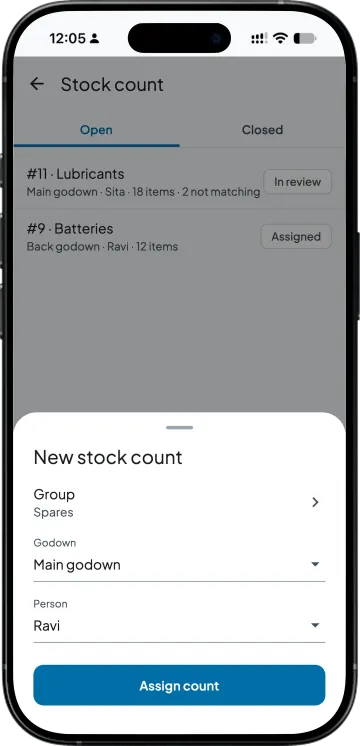
One stock group in one godown, given to one person
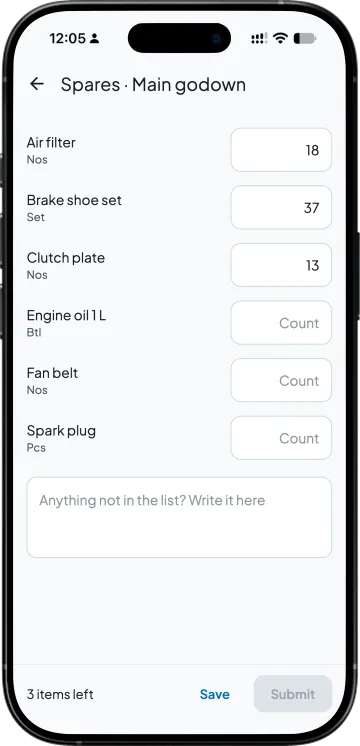
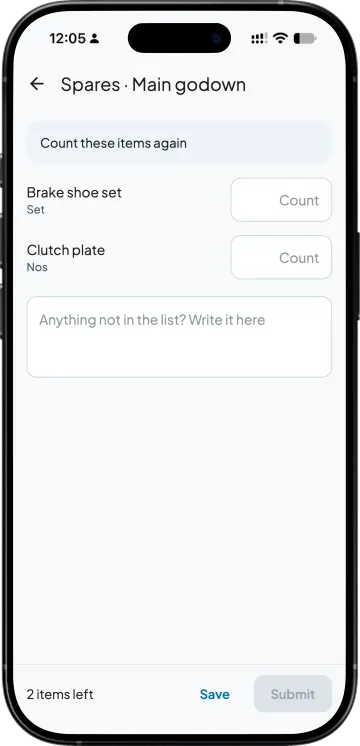
The counter sees item names and units, never the book stock
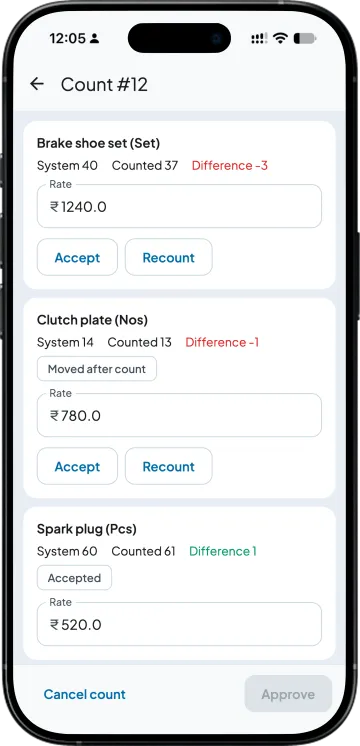
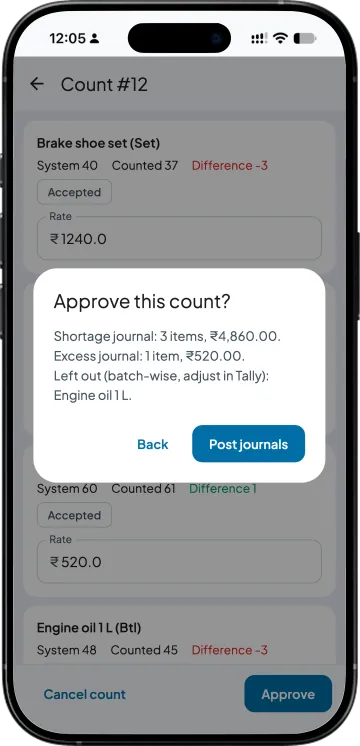
Book stock, counted and difference side by side for your review
Approve, and the stock journal for Tally is made at cost rate
Made for owners who want the shelf and Tally to agree
A distributor with two godowns and a year-end count
Today. The stock summary is printed, the staff tick it off, and where a shelf is hard to reach they write the book figure.
With Takkada. Each group in each godown goes to one person who sees no book figure, and you see only the items that differ.
An auto parts trader with a thousand small items
Today. One big count a year over a Sunday, and it never quite finishes.
With Takkada. One group at a time, up to 500 items in a count, spread through the year.
A wholesaler whose shortages never seem to show up
Today. The person who handles the stock also counts it and also checks it.
With Takkada. Someone else counts, the person who counted cannot approve, and every difference is valued at cost before you approve it.
Work you stop doing
Printing the stock summary for the counter
Comparing a paper sheet with Tally line by line
Working out the value of each shortage on a calculator
Typing the stock journal at the Tally computer
PHYSICAL STOCK COUNT
One count, from assigning it to the stock journal
One group, one godown, one person
Pick a stock group or a subgroup, the godown and the person, and assign the count. Every item in the group goes on the list, zero-stock items too, so the list itself gives nothing away. A count holds up to 500 items, and you cannot assign one to yourself.
Counted blind on the phone
The counter sees item names and units with a box for each and types what is on the shelf. They save as they go, the screen shows how many items are left, and anything not on the list goes in a note for you.
Stock hidden from the counter in Takkada
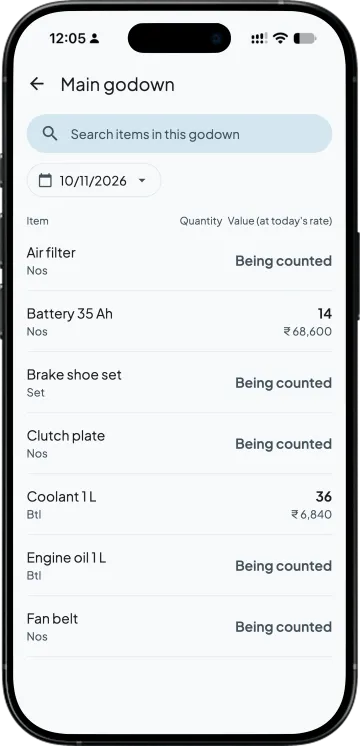
While the count is open, the stock of those items is hidden from the counter across Takkada: the item page, stock reports and the billing picker show Being counted. The items can still be billed; only the quantity is hidden.
Every difference in front of you
Book stock is frozen the moment the counter submits. You see book stock, counted, difference and the rate for each item, and anything sold, bought or moved after the count is marked Moved after count, so a sale is not read as a shortage.
Send one item back for a recount
Accept a difference, or send just that item back. The counter sees only the items sent back, with empty boxes, so the first number cannot steer the second. The person who counted cannot review or approve their own count.
Approve, and the stock journal is made for Tally
Before you approve, the app shows the shortage and excess value. Approval makes the stock journal for Tally, shortages out of the godown and extra stock in, at the rates you approved, and sends it through Takkada's Tally connector. Batch-wise items are counted but left out of the journal; adjust those in Tally by batch.
SIDE BY SIDE
A stock count with a printed sheet and Tally, and with Takkada
What you need
Tally with Takkada
Printed sheet and Tally
Who counts
One person you pick, on their own Takkada login, for one group in one godown.
Whoever has the time, working from a printed stock summary.
What the counter sees
Item names and units; the book figure stays off their screen in Takkada.
The book figure, printed next to each item.
Stock that moves during the count
Book stock frozen at submit; items sold, bought or moved afterwards are marked Moved after count.
A sale made during counting looks like a shortage.
A doubtful figure
That one item goes back to the counter with an empty box.
The whole shelf is counted again, or the figure is let through.
Value of each difference
At cost: the godown's FIFO cost, else Tally's closing rate, else a rate you type.
Worked out later by the accountant.
The Tally entry
The stock journal made for Tally when you approve: shortages out, extra stock in.
A Physical Stock voucher or a journal typed in at the Tally computer.
Tally Prime's Physical Stock voucher records the counted quantity and Tally books the gap itself. Takkada makes a Stock Journal for the difference instead, at the rates you approved, and sends it to Tally through Takkada's Tally connector. Batch-wise items are counted but left out of the journal; adjust those in Tally by batch.
Physical Stock Count is an add-on, priced by your partner. Ask them for the add-on price, or message us and we will switch it on for your company.
No. While the count is open, the counter sees item names and units, and the stock of those items is hidden from them across Takkada, including the item page, stock reports and the billing picker. Takkada cannot hide stock inside Tally itself, so give the count to someone who does not work in Tally.
The items stay on sale; only their quantity is hidden from the counter. Book stock is frozen when the counter submits, and any item sold, bought or moved in that godown after that is marked Moved after count on your review screen, so you can recount it before you approve.
At cost. Each difference takes the godown's FIFO cost, or Tally's closing rate where there is none, or a rate you type, and you can change any rate before you approve. The approve screen shows the total shortage and excess value first.
No. Tally's Physical Stock voucher records the counted quantity; Takkada makes a Stock Journal for the difference instead, the entry accountants already use for stock adjustments, with shortages going out of the godown and extra stock coming in at the rates you approved.
Batch-wise items are counted but left out of the journal, and the review marks them Batch-wise: adjust in Tally. Correct those in Tally by batch. Items that are not batch-wise go through the full count, review and stock journal.
One count is one stock group or subgroup in one godown, up to 500 items, and the same item cannot be on two open counts in the same godown. For a full year-end count, make one count per group and godown and give them to different people.
Yes. You can review and approve on the phone or in the Takkada web app. With the Desktop entry add-on the review opens as a table, where A accepts the highlighted line and R sends it back for a recount.
It is an add-on on top of a Takkada plan, priced by your partner, and it is switched on for each company separately. Ask your partner for the price, or message us on WhatsApp and we will switch it on for your company.