A two-wheeler or EV dealer
- Today. Chassis and motor numbers live in a register, and the clerk copies them under the item on every bill.
- With Takkada. The vehicle is picked from those in stock, and its numbers print on the bill from its own details.

Tally can hold each unit as a batch named by its serial number, but the engine number, colour or battery number have to live in a register, and the clerk has to remember which numbers are already sold. The Custom Fields add-on keeps those details with every unit, offers only units still in stock, and prints them under the item on the bill.
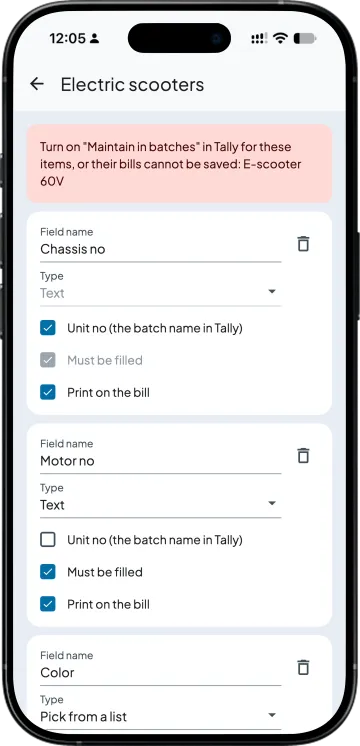
Pick a stock group and add the details you keep for every unit: chassis no, motor no, colour, battery no, IMEI, anything. Each field is text, a number, a date or a pick from a list, and you choose which must be filled and which print on the bill. One field is the Unit no, the batch name in Tally, so turn on "Maintain in batches" for those items in Tally; the app lists any item that is not.
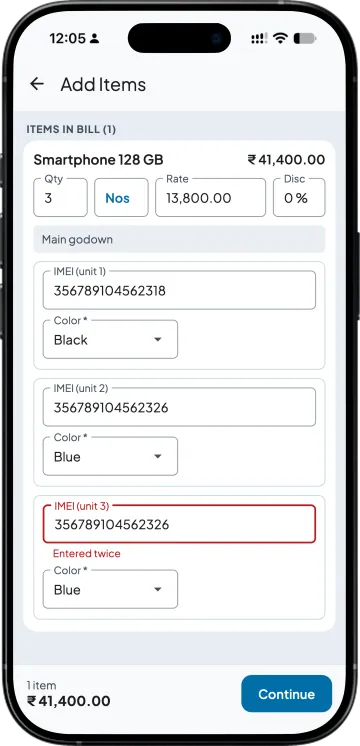
Buy 5 and you get 5 rows, one per unit, on the purchase invoice, goods receipt, stock journal inward or sales return. Paste a column of numbers to fill them at once. A number typed twice is flagged before you save, and a unit already in stock cannot be bought again.
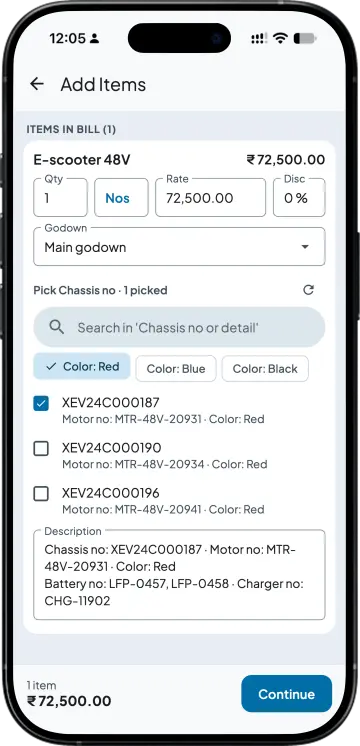
On a sales order, delivery challan, sales invoice, debit note or stock journal, the list shows only the units still in stock in that godown, each with its details; search, or tap a detail like "Color: Red". The units you pick set the quantity and fill the description lines. No unit is sold twice, built into two products or booked on two orders in Takkada: the bill is refused, naming the bill that holds it.
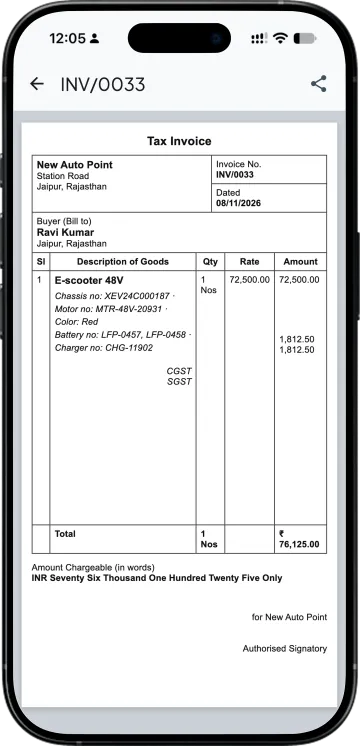
The details print under the item on the sales invoice, sales order, delivery challan, credit note and debit note. Units picked on a sales order are held for that customer, and they carry from order to challan to invoice. The sale goes to Tally through Takkada with each Unit no as the batch and the details in the item's description lines.
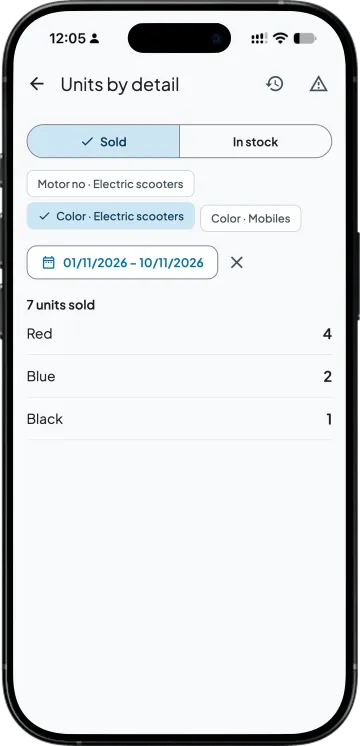
How many Red sold this month, how many 48V batteries are in stock: Units by detail counts units sold or in stock by any field, between the dates you pick. A battery that went out inside a sold scooter counts as sold too.
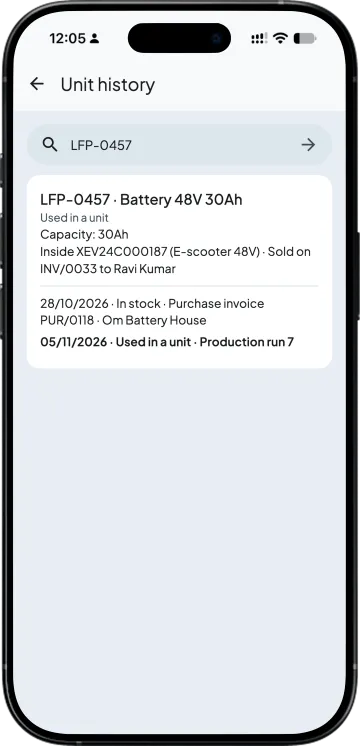
Type a chassis no, battery no, IMEI or any detail and Unit history shows the unit, the vehicle it went into or the parts inside it, and every step with date, bill number and party. Units bought or made straight in Tally show up marked Details missing after Takkada syncs with Tally, so you can fill them in.
| What you need | Tally with Takkada | Tally batches alone |
|---|---|---|
| Details per unit | Your own fields per stock group, with the Unit no as the Tally batch. | The batch name only; the rest in a register or Excel. |
| Entering 20 units | One row per unit; paste a column of numbers. | Each batch typed into the purchase voucher at the Tally computer. |
| The same number twice | Refused in Takkada, naming the bill that holds it. | Up to the clerk to notice. |
| Picking at the sale | Only units still in stock in that godown, searchable by any detail. | The batch list, with details looked up elsewhere. |
| On the bill | The details print under the item. | Typed by hand into the item description. |
| Parts in a finished unit | Linked in the production run, with the Manufacturing add-on. | Kept in a notebook. |
| Reports | Units sold or in stock by any field, and one unit's history. | Batch Summary by batch name. |
Turn on "Maintain in batches" in Tally for these items. Takkada keeps the details, and the Unit no goes to Tally as the batch through Takkada's Tally connector. A sale typed straight into Tally is matched after Takkada syncs, not blocked. Production runs need the Manufacturing add-on and cover in-house production, not job work.
Custom Fields is an add-on, priced by your partner. Ask them for the add-on price, or message us and we will switch it on for your company.
Momentum ₹3,375/year + GST on a 3-year term
See what every plan includesTally Prime has no separate serial-number field on a stock item. Tally's own help keeps each unit as a batch named by its serial number or IMEI, with batches switched on for the item, and the Batch Summary report then shows which numbers are still in stock. That records the number only, so details like colour or engine number have to be kept somewhere else.
No. Takkada keeps the details, and the Unit no goes to Tally as the batch through Takkada's Tally connector, the same connector that sends your other bills. In Tally you only turn on "Maintain in batches" for the items in that stock group.
No unit is sold twice in Takkada. Every bill made in Takkada, on the phone, the web app or a van, is checked, and a unit already sold, built into another product or held on another order is refused with the bill that holds it named. A sale typed straight into Tally is matched after Takkada syncs, not blocked, and shows under Units needing attention for you to clear.
Any you choose, per stock group: text, a number, a date or a pick from a list, such as chassis no, motor no, colour, battery no or IMEI. Every item in the group and its subgroups asks for them, and a subgroup can have its own. Remove a field later and the details already saved stay.
Yes. The fields you mark Print on the bill print under the item on the sales invoice, sales order, delivery challan, credit note and debit note, and you can still edit those lines before you save. The sale goes to Tally through Takkada with each Unit no as the batch and the details in the item's description lines.
Units bought or made in Tally show up in Takkada marked Details missing after Takkada syncs with Tally, so you can fill in their details before you sell them. Turn on "Maintain in batches" in Tally first, so each unit comes through as its own batch.
Tally Prime's own invoice customisation adds fields to the company or the invoice as a whole, and fields on each stock item or unit need a TDL written for your Tally. The Custom Fields add-on keeps the fields in Takkada instead, per stock group, with the Unit no as the Tally batch, so nothing is installed in Tally.
Yes. Set up fields, buy, sell and see the reports on the phone, or in a computer browser with Web view, which comes with the Assurance plan. With the Desktop entry add-on, Custom fields and Units by detail sit in the Stock menu of the computer layout.
It is an add-on on top of a Takkada plan, priced by your partner, and it is switched on for each company separately. Ask your partner for the price, or message us on WhatsApp and we will switch it on for your company.
Book a demo. We walk through your setup, your Tally version, and exactly what changes for your business.