Every phone in stock by its IMEI, and every bill picks from the phones you still have.
In Tally a phone can be a batch named by its IMEI, but typing twenty IMEIs into a purchase voucher is slow, and the colour and storage sit somewhere else. With the Custom Fields add-on, the IMEIs are pasted in on the purchase, each phone keeps its details, and the sale bill offers only phones still in that godown.
Made for shops and distributors that sell phones one IMEI at a time
A mobile shop with two counters
Today. Both counters bill from the same box, and the same handset can end up on two bills.
With Takkada. Each counter picks from phones still in stock, and if both bill the same phone at the same moment, only one bill goes through.
A mobile distributor supplying 200 retailers
Today. A retailer calls about a handset, and nobody knows which bill it went out on.
With Takkada. Type the IMEI and see the bill, the date and the retailer.
An electronics dealer who books phones on order
Today. A booked phone gets sold off the shelf to a walk-in customer.
With Takkada. Phones picked on a sales order are held for that customer, and no other order or bill is offered them.
Work you stop doing
Typing IMEIs into the purchase voucher one by one
Writing IMEIs in a register beside Tally
Typing the IMEI under the item on every bill
Searching old bills for one handset
IMEI TRACKING
From the carton to the customer's bill
Paste the IMEIs on the purchase
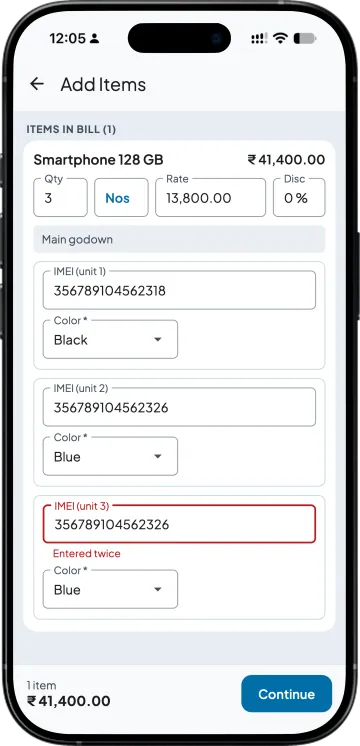
Set the IMEI as the Unit no for your phones' stock group, with colour or storage beside it, and turn on "Maintain in batches" for those items in Tally. Buy 20 and you get 20 rows; paste the column of IMEIs from the supplier's list. An IMEI typed twice is flagged as Entered twice, and a phone already in stock cannot be bought again.
Pick from phones in stock
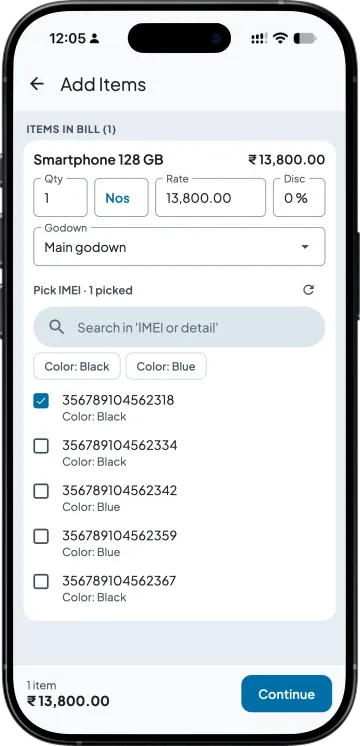
On the sales order, challan or invoice, the list shows only the phones still in stock in that godown, with their colour and details. Search by the last digits of the IMEI; the phones you pick set the quantity, and their IMEIs fill the description lines.
No IMEI sold twice in Takkada
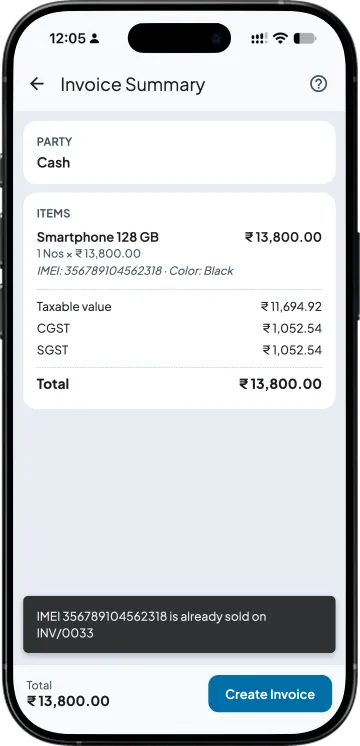
A phone already sold or held on another order is refused, naming the bill that holds it, and if two people bill the same phone at the same moment, only one bill goes through. Cancel a bill and its phones can be sold again. A sale typed straight into Tally is matched after Takkada syncs, not blocked.
Phones counted by colour or model
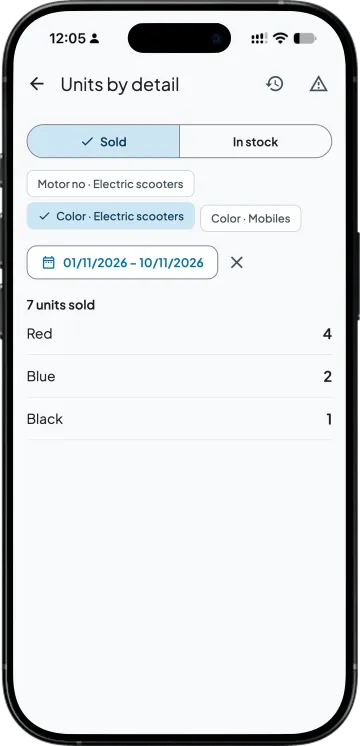
Units by detail counts phones sold or in stock by any field you set up, between any dates. Unit history finds one IMEI: the purchase it came in on, the bill it went out on, and the party.
SIDE BY SIDE
IMEIs in a register beside Tally, and in Takkada
What you need
Tally with Takkada
Register beside Tally
Entering 20 phones
Paste the column of IMEIs, one row per phone.
Each IMEI typed into the purchase voucher and the register.
Colour, storage, model
Your own fields, kept with each IMEI.
Columns in the register.
Billing a phone
Pick from phones still in stock in that godown; search by IMEI.
Read the IMEI off the box and type it.
The same IMEI twice
Refused in Takkada, naming the bill that holds it.
Found when the customer comes back.
A returned phone
The credit note offers only the phones on that invoice, and the phone is back in stock.
The register corrected by hand.
Finding a phone later
Unit history: bill, date and party.
Register pages and old bills.
Turn on "Maintain in batches" in Tally for these items; each IMEI goes to Tally as the batch through Takkada's Tally connector. A sale typed straight into Tally is matched after Takkada syncs, not blocked.
Custom Fields is an add-on, priced by your partner. Ask them for the add-on price, or message us and we will switch it on for your company.
Tally Prime has no IMEI field of its own, so the usual way is to switch on batch-wise details, set the phone's stock item to Maintain in batches, and type each IMEI as a batch of quantity 1 on the purchase. With the Custom Fields add-on you paste the IMEIs on the purchase in Takkada instead, and each one goes to Tally as that phone's batch.
Rule 46 of the CGST Rules, which lists what a tax invoice must carry, does not name the IMEI, so printing it is your choice; confirm with your CA for your own case. Printed IMEIs help when a customer brings a phone back. In Takkada, the IMEI and any field marked Print on the bill print under the item.
No IMEI is sold twice in Takkada. Each bill offers only phones still in stock in that godown, a phone already sold is refused with the bill that holds it named, and if two people bill the same phone at the same moment, only one bill goes through.
Yes. Units by detail counts phones sold or in stock by any field you set up, such as colour, storage or model, between the dates you pick. Filter by dates to see a month at a time.
Make a credit note against the invoice and it offers only the phones that were on that invoice. The returned phone is back in stock to sell again, with its IMEI and details as they were.
IMEI tracking is part of the Custom Fields add-on, priced by your partner and switched on for each company separately. Ask your partner for the price, or message us on WhatsApp and we will switch it on for your company.