An owner who allowed a special rate on a big order
- Today. Asks the accountant to check the margin after the bill is made.
- With Takkada. Opens the saved invoice and reads the margin on each line.

Tally shows profit per invoice once you turn it on in the Sales Register. Takkada puts cost and margin on the invoice itself, line by line, for the people you allow, using each item's cost for that financial year as your Tally values it.
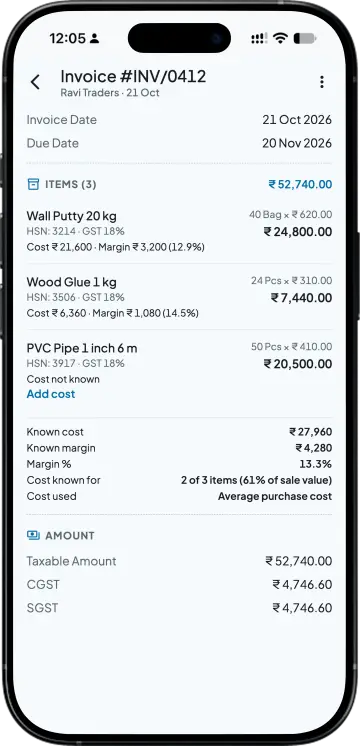
Cost, Margin and Margin % on each line of a saved sales invoice. Margin % on the invoice is on selling price, so a line sold for 100 that cost 80 shows 20%. Cost is the item's cost for that financial year as your Tally values it. The owner turns on Show margin on invoice, and only members allowed to see profit see it.
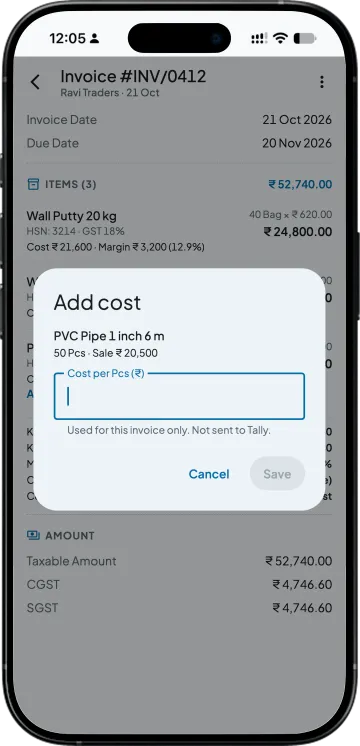
Tap Add cost on the line and type the cost per unit. It is used for this invoice only and not sent to Tally; to change the item's cost everywhere, correct it in Tally.
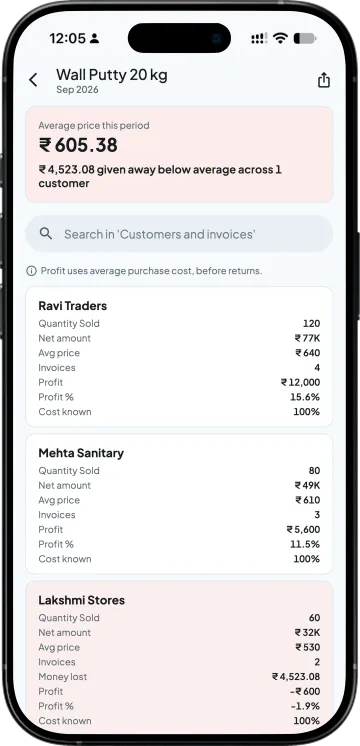
Sales by Item, an item, its customers at their average price, then the invoice with its margin. Sales by Item takes customer returns (credit notes) off and shows them in a Returns column.
| What you need | Tally with Takkada | Tally alone |
|---|---|---|
| Where the profit shows | On the saved invoice, line by line. | The Sales Register, a month opened and F7 (Show Profit) pressed, one row per invoice. |
| Margin percent | Margin % on each line, on selling price. | Worked out by hand from the Gross Profit column. |
| Who sees it | Only people you allow to see profit, after the owner turns it on. | Anyone who can open the Sales Register in Tally. |
| A missing cost | Typed for that invoice only, not sent to Tally. | Fixed in the item's cost in Tally. |
| Where you read it | Phone or web app, from your Tally as of the last sync. | The Tally computer. |
Cost is the item's cost for that financial year as your Tally values it. Margin % on the invoice is on selling price. Sales by Item shows customer returns (credit notes) in a Returns column.
Cost and margin on the invoice are on every plan; the owner turns them on in settings.
Momentum ₹3,375/year + GST on a 3-year term
See what every plan includesOpen the Sales Register, go into a month and press F7 (Show Profit). Each invoice then shows Transaction Value, Gross Revenue, Cost and Gross Profit, and a loss shows with a minus sign. In Takkada, open the saved sales invoice itself to see cost and margin line by line.
The item's cost for that financial year as your Tally values it. It is not a cost Takkada works out on its own, so if the margin looks wrong, the item's cost in Tally is the place to check first.
Margin % on the invoice is on selling price. A line sold for 100 that cost 80 shows 20%, which is 25% on cost. Quote the same basis to your salesmen and your accountant so the two numbers agree.
Only if you allow them to see profit. The owner first turns on Show margin on invoice, and then cost and margin show only to members allowed to see profit. Everyone else opens the same invoice without the cost and margin section.
Tap Add cost on that line and type the cost per unit. It is used for that invoice only and is not sent to Tally, so the margin on that bill reads right while the item itself stays as it is in your books.
No. A cost typed on a line is used for that invoice only and is not sent to Tally. To change the item's cost everywhere, correct it in Tally, and the next sync brings it into Takkada.
Book a demo. We walk through your setup, your Tally version, and exactly what changes for your business.