Which customer bought which item, how much and at what price, from your Tally books.
In Tally that means the item in Stock Summary on one side, the party's ledger on the other, and an export or a TDL to join them. Sales by Item puts the two together on the phone: group your sales by item, stock group, customer or month in one tap, then open any item to see who bought it and at what average price.
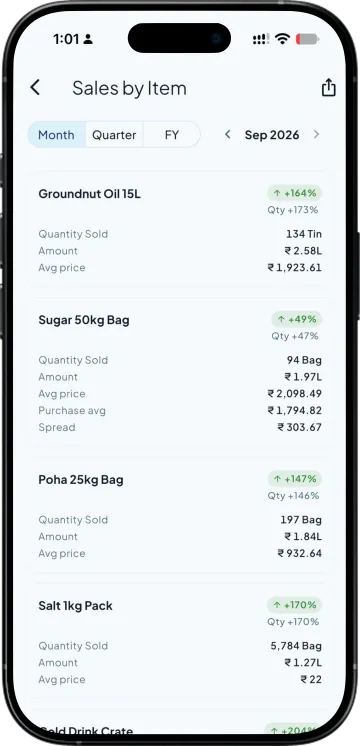
Quantity, net amount, average price and the change against last period
Group by Item, Group, Customer or Month; Category, Area, Voucher Type or Cost Centre when your Tally uses them
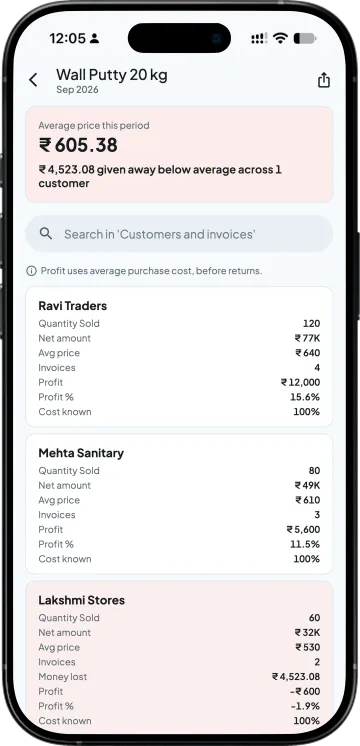
An item, then its customers at their average price, then the invoices
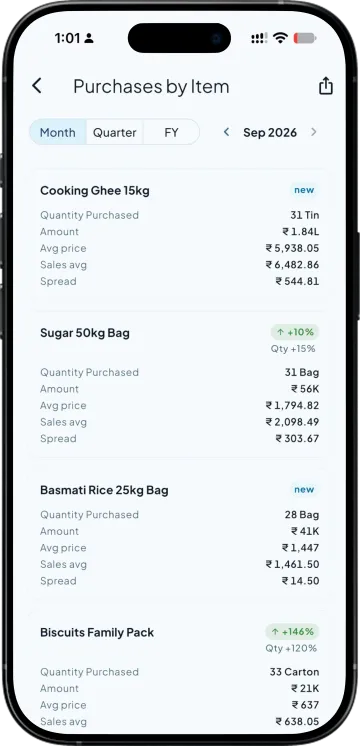
Purchases by Item, supplier by supplier, with the gap to your selling price
Made for owners who sell one item to many customers at different rates
A paint and hardware distributor before a rate revision
Today. Exports the sales register and builds a pivot to see what each customer paid for one item.
With Takkada. Opens the item and reads each customer's quantity and average price for the month.
An FMCG stockist reviewing the month by brand group
Today. Asks the accountant for party-wise sales, then item-wise, then tries to match the two.
With Takkada. Groups the same sales by stock group, then by customer, from one screen.
An auto parts trader who buys one part from two suppliers
Today. Opens one item at a time to see who supplied it at what rate.
With Takkada. Reads Purchases by Item for each item's suppliers and the average rate paid to each.
Work you stop doing
Building pivots from an exported sales register
Buying an add-on to join party and item sales
Asking the accountant for the same report twice
Adding boxes and pieces into one number
ITEM AND PARTY SALES
From all items to one customer's invoices
Every item for the month, quarter or year
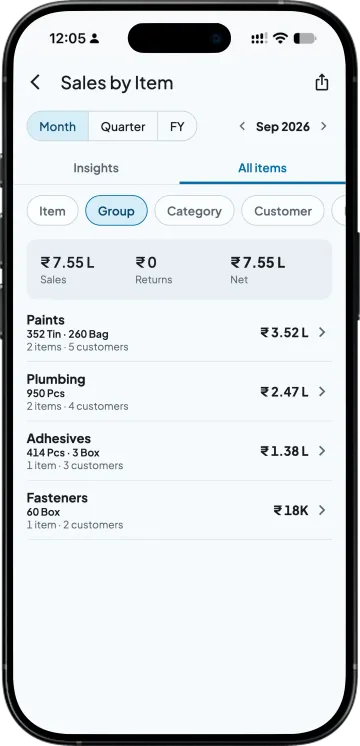
Quantity, net amount after line discount and before GST, average price and the change against the previous period. Use the arrows to step back a month or a quarter.
One tap to group
All items, or group by Item, Group, Customer or Month; Category, Area, Voucher Type and Cost Centre appear when your Tally uses them. Grouped rows show quantity in each unit, such as 120 Box and 40 Pcs, never one added-up figure.
An item, its customers, their invoices
Tap an item for the customers who bought it and their average price this period, then a customer for the invoices. Goods your customers returned (credit notes) are taken off and shown in a Returns column.
The purchase side, supplier by supplier
Purchases by Item shows what each item cost you, the average rate and the gap against your selling price. Goods you returned to suppliers (debit notes) are taken off the same way.
Out to Excel or PDF
Export either report and send it from the phone's share sheet. Owners and full-access team members see item-wise sales and profit; you choose who else sees reports.
SIDE BY SIDE
Item and party sales in Tally alone, and with Takkada
What you need
Tally with Takkada
Tally alone
Which customer bought an item
Tap the item: its customers with quantity and average price.
Stock Summary for the item and each party's ledger, joined by hand or with an add-on.
Grouping
Item, Group, Customer or Month in one tap; Category, Area, Voucher Type and Cost Centre when used.
One report per view.
Change against last period
A vs previous figure on every row.
A second column added for the earlier period with Alt+C (New Column).
Where you read it
Phone or web app, from your Tally as of the last sync.
The Tally computer.
Sales by Item takes customer returns (credit notes) off and shows them in a Returns column; Purchases by Item does the same with debit notes. Owners and full-access team members see item-wise sales and profit; you choose who else sees reports.
Sales by Item and Purchases by Item are on every plan, starting with the entry one.
Tally Prime shows one side at a time: Stock Summary for an item, and a party's ledger or Ledger Movement Analysis for what that party bought. Putting the two together usually takes an export to Excel or a TDL. In Takkada, open Sales by Item and group it by Customer, or tap an item to see its customers.
Yes. Tap the item in Sales by Item and you see every customer who bought it this period, with the quantity and their average price. Tap a customer to see the invoices behind that figure, for the month, the quarter or the financial year.
Yes. Sales by Item takes goods your customers returned on credit notes off each item and shows them in a Returns column, and Purchases by Item does the same with debit notes. The Insights cards read sales and purchases before returns.
Yes. When you group sales by stock group, customer or month, each row shows the quantity in each unit, for example 120 Box and 40 Pcs. Takkada does not add different units into one figure, so a group that sells in two units reads correctly.
Yes. One tap groups the same sales by Item, Group (your Tally stock group), Customer or Month. Category, Area, Voucher Type and Cost Centre appear as choices only when your Tally books use them, so an unused option never shows an empty list.
Owners and full-access team members see item-wise sales and profit. Other team members see the reports you give them through the Reports permission, so a salesman can read his own work without seeing what every item earns across the business.