Eight questions your Tally sales and purchases can answer before you open a table.
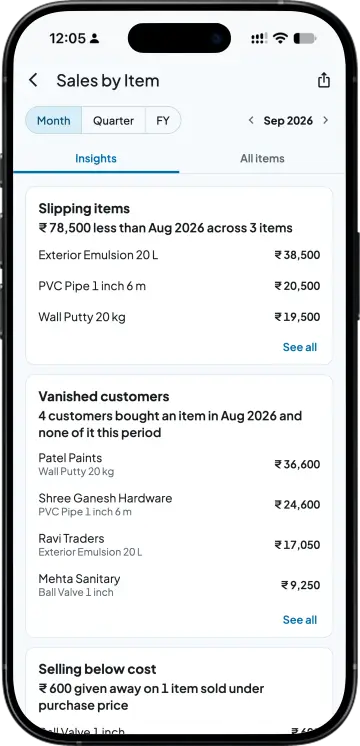
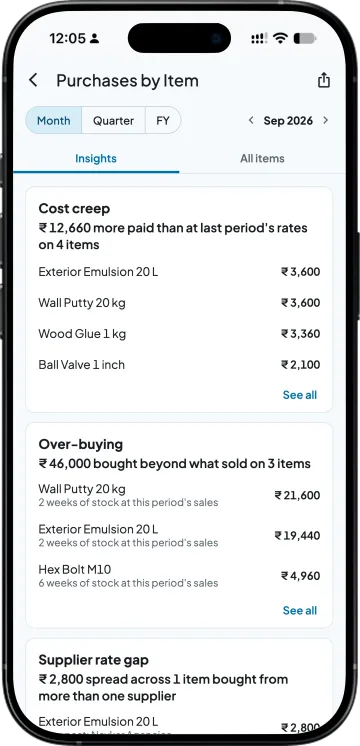
Which items are slipping, which customers stopped buying something, what went out below cost, which few items carry the business. On the buying side, what costs more than last time, what you bought beyond what sold, where two suppliers charge different rates, and what has not sold in 60 days. The Insights tab answers each on one card.
Made for owners with five minutes, not an afternoon
A distributor whose regular customer quietly moved one item to another supplier
Today. Finds out at the year-end ledger review.
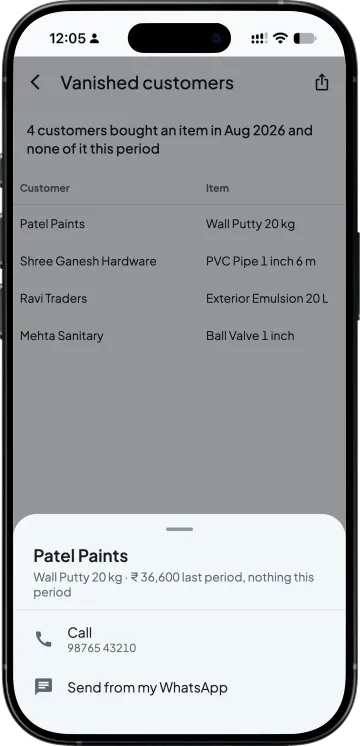
With Takkada. Sees the customer under Vanished customers the month it happens, and sends a ready message from their own WhatsApp.
An owner whose salesmen agree rates at the counter
Today. Learns of a below-cost sale when the month's margin falls.
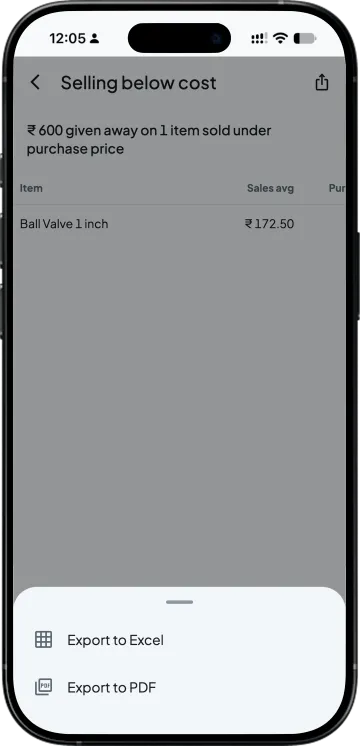
With Takkada. Reads Selling below cost for the items sold under purchase price and the amount given away.
A buyer placing the monthly purchase order
Today. Reorders what sold the same month last year.
With Takkada. Checks Over-buying and Dead stock before the order goes out.
Work you stop doing
Scanning profit columns for minus signs
Opening customer ledgers one by one to see who stopped
Comparing supplier bills for the same item by hand
Exporting registers to sort them in Excel
INSIGHTS
Four questions on sales, four on buying
Four sales questions on one screen
Slipping items, Vanished customers, Selling below cost and What's carrying me. Each card answers its question in one line before you read a table, for the period you pick.
Customers who stopped buying an item
Who bought an item last period and none of it this period, with what they spent. Send from my WhatsApp opens your own WhatsApp with a ready message, one customer at a time, or tap Call.
What went out below cost
Items sold under their purchase price this period, and how much was given away. Cost is the purchase price as Takkada reads it from your Tally. Every card opens its full list for Excel or PDF.
Four buying questions
Cost creep, Over-buying, Supplier rate gap and Dead stock, which lists the biggest 25 items with no sale in 60 days or more. Read them before the next purchase order goes out.
SIDE BY SIDE
Finding these answers in Tally alone, and with Takkada
What you need
Tally with Takkada
Tally alone
Items sold below cost
One list with the amount given away.
The Sales Register with F7 (Show Profit), scanned for minus signs invoice by invoice.
Customers who stopped buying an item
Vanished customers, with a ready message to send from your own WhatsApp.
No built-in list; customer ledgers read one by one.
The same item from two suppliers
Supplier rate gap, across every item.
Stock Item Movement Analysis, one item at a time.
Stock with no sale in 60 days
Dead stock, the biggest 25 by value.
Stock Ageing Analysis, which needs batches turned on for the company and the items.
Items that make most of your sales
What's carrying me: the items that make 80%.
Sorted and added up in Excel.
Cards are worked out when you open the tab; they are not alerts. Cost is the purchase price as Takkada reads it from your Tally. The cards read sales before returns; the Sales by Item list shows customer returns (credit notes) in a Returns column.
Insights are included for every Takkada company, inside Sales by Item and Purchases by Item.
Open the Insights tab in Sales by Item and tap Vanished customers. It lists everyone who bought an item last period and none of it this period, with what they spent. From a row, send a ready message from your own WhatsApp, one customer at a time, or call.
In Tally Prime, open the Sales Register, go into a month and press F7 (Show Profit); a loss shows as a minus sign, invoice by invoice. In Takkada, the Selling below cost card lists the items sold under purchase price this period and how much was given away.
The few items that make 80% of your sales for the period, for example 5 items make 80% of your sales. When one item is 30% or more of the total, the card names it and its share. Those are the items never to run out of.
No. Send from my WhatsApp opens your own WhatsApp with a ready message for one customer, and you press send. You can also call from the same row, and then move on to the next customer on the list.
No. The cards are worked out each time you open the Insights tab, for the period you pick. Open it once a week or at month end, and the Slipping items card shows how much less each item earned than in the last period.
An item with stock and no sale in 60 days or more. The Dead stock card lists the biggest 25 such items by value, so the money stuck longest in the godown is at the top, and the full list goes to Excel or PDF.
Yes. Insights are included for every Takkada company, inside Sales by Item and Purchases by Item, with nothing to switch on. Owners and full-access team members see item-wise sales and profit; you choose who else sees reports.